# COTI FAQ

{% hint style="info" %}
This website aims at people who are new to COTI and serves as an all in one place knowledge base with the most important information for COTI holders.

The information provided is subject to change. Use the information on this website at your own responsibility. This is an unofficial COTI website run by COTI Unity Node (testnet).&#x20;

You can find offical information provided directly by COTI at <https://coti.io/> and <https://medium.com/cotinetwork>.
{% endhint %}

{% hint style="danger" %}
COTI V2 has launched. Still, we are in a transition period right now when it comes to certain features. That's why some content is not up to date right now. Once all releveant features are available on V2 and the transition is complete, the FAQ will be updated!
{% endhint %}

<figure><img src="https://1669873050-files.gitbook.io/~/files/v0/b/gitbook-x-prod.appspot.com/o/spaces%2Fbb9VxoqAgZO2p5RjTuh9%2Fuploads%2FNZzbKCt5Nd4z04WShswM%2FCotit%20Unity%20Node%20Final%20transparent.png?alt=media&amp;token=d72c26bb-0491-4da7-92a0-e8c903520c38" alt="" width="188"><figcaption><p>powered by COTI Unity</p></figcaption></figure>


# Introduction

{% embed url="<https://www.youtube.com/watch?v=AvEBZp4Uv_Y>" %}


# The COTI foundation

<figure><img src="https://1669873050-files.gitbook.io/~/files/v0/b/gitbook-x-prod.appspot.com/o/spaces%2Fbb9VxoqAgZO2p5RjTuh9%2Fuploads%2Fsh6jMsVT4KHmqWExyZHD%2Fimage.png?alt=media&amp;token=71f7b7f1-34b5-48e1-8b33-4aa1810008b9" alt=""><figcaption></figcaption></figure>

The COTI Foundation is an independent non-profit organization, dedicated to the advancement and adoption of the COTI network.

The COTI foundation's objectives are:

* Awareness and education
* Adoption
* Infrastructure development
* Network security

With the introduction of COTI V2 there will also be an Ecosystem Fund.

The COTI Foundation intends to utilize the Ecosystem Fund to expand COTI’s ecosystem, strengthen community ties, and enhance outreach efforts. This may involve reinforcing treasury rewards, improving liquidity across exchanges, securing additional token listings, or initiating targeted strategic campaigns.

Through the Ecosystem Fund, COTI Foundation has the potential to accelerate the development, deployment, and utilization of privacy-centric Web3 applications. In fact, several developers have already been engaged to ensure that COTI launches with unique projects running on day one.

A total of two 200M $COTI token tranches from the existing supply will be earmarked for the Ecosystem Fund. These tokens will be granted with locking conditions and will be conservatively reflected in the circulated supply once allocated. Upon the launch of the COTI V2 mainnet, the newly minted tokens designated for the ecosystem allocation will be directed to the Ecosystem Fund. The governance and management of the fund is entrusted to the COTI Foundation, underscoring our dedication to cultivating a vibrant and sustainable ecosystem.

**Startups or developers interested in applying for funding through the COTI Ecosystem Fund will be able to submit their applications early next year. COTI looks forward to supporting innovative Web3 startups and expanding the COTI ecosystem.**

{% hint style="info" %}
You can find further information in the video below and at <https://coti.foundation/>.
{% endhint %}

{% embed url="<https://www.youtube.com/watch?v=ABuQnjeHYMU>" %}


# COTI V2


# Introduction

{% embed url="<https://www.youtube.com/watch?v=XSznWGvLtbA>" %}

{% embed url="<https://www.youtube.com/watch?v=Ut-B8O6wXLw>" %}

{% embed url="<https://www.youtube.com/watch?v=AvEBZp4Uv_Y>" %}


# COTI V2

{% hint style="info" %}
Get all the information about COTI V2 in detail here: \
\
<https://medium.com/cotinetwork/how-coti-is-gearing-up-for-2024-and-beyond-e0d465794767#400d>
{% endhint %}

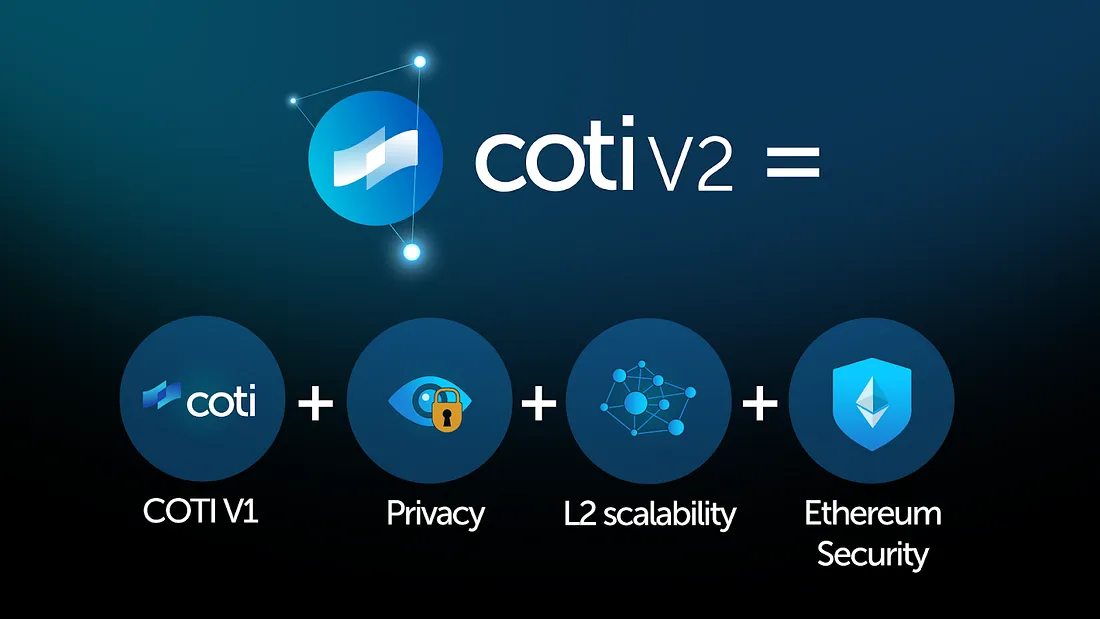
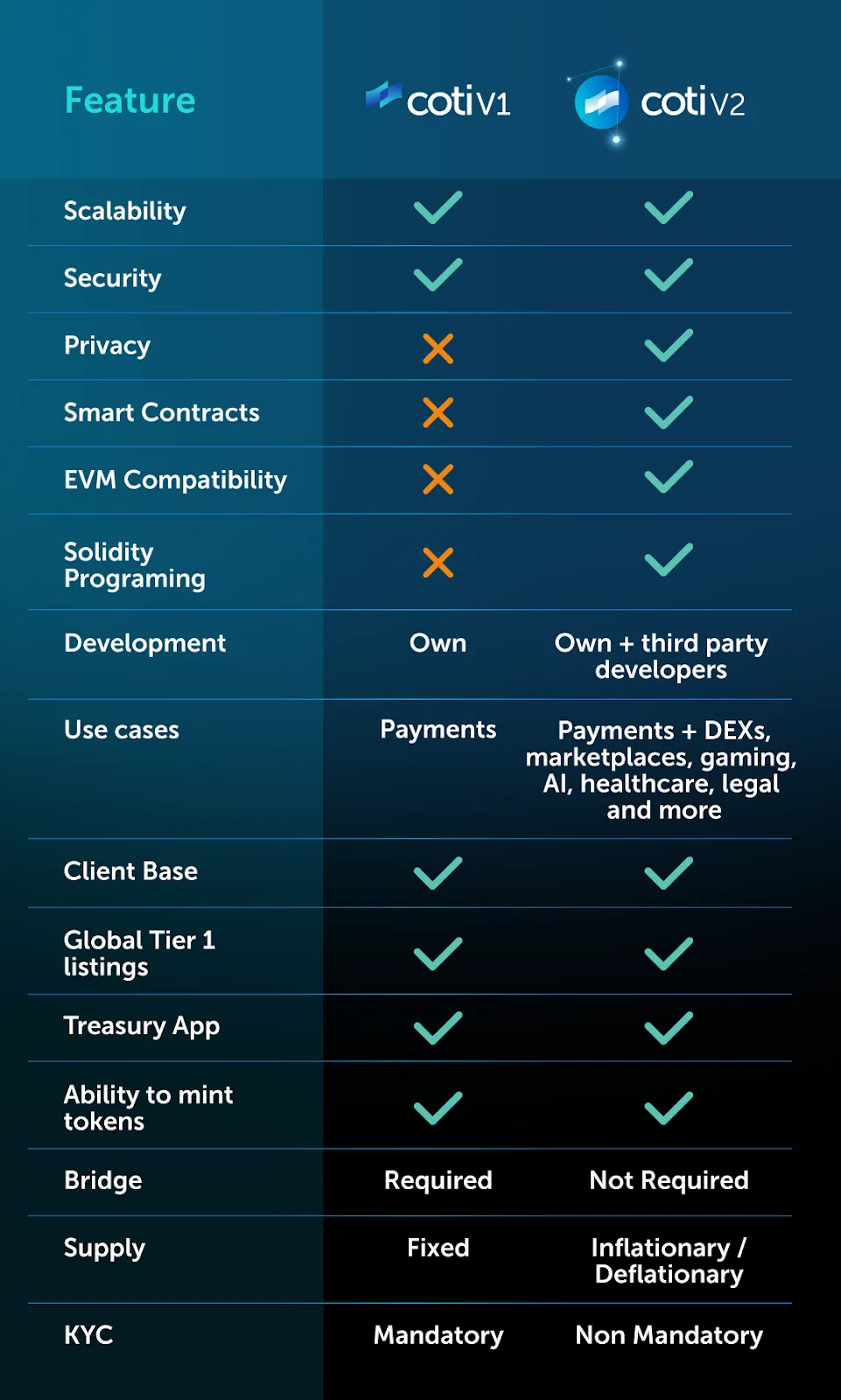
COTI V2 is privacy-centric Etherum Layer 2 offering high speed, scalable privace utilizing the security and liquidity of Ethereum. COTI V2 will be using garbled Circuits.

COTI V2 will offer:

* Easier development for third-party developers
* New Use Cases and dApps development
* Reduced costs for users
* Increased brand awareness
* Enhanced network impact
* Attrating institutional and enterprise clients
* Compliance and regulatory advantages
* Potential for new revenue streams

<figure><img src="https://1669873050-files.gitbook.io/~/files/v0/b/gitbook-x-prod.appspot.com/o/spaces%2Fbb9VxoqAgZO2p5RjTuh9%2Fuploads%2FIGJNCEMtvciK9I0eyDPn%2Fimage.png?alt=media&amp;token=ee01f38b-4ff5-4ee6-b592-b22aa2bfd8ba" alt=""><figcaption></figcaption></figure>

<figure><img src="https://1669873050-files.gitbook.io/~/files/v0/b/gitbook-x-prod.appspot.com/o/spaces%2Fbb9VxoqAgZO2p5RjTuh9%2Fuploads%2FrLQEI9ubBWLpxI6dGajW%2Fimage.png?alt=media&amp;token=793f865c-9600-4724-903a-13d66c92a3c3" alt=""><figcaption></figcaption></figure>


# Use Cases

{% hint style="info" %}
Get all the information about COTI V2 in detail here: \
\
<https://medium.com/cotinetwork/how-coti-is-gearing-up-for-2024-and-beyond-e0d465794767#400d>
{% endhint %}

Potential Use Cases of COTI V2 are:

* DEXs
* Artificial Intelligence
* Real-world asset managment
* Gaming, GameFI and GambleFi
* Decentarlized social networks and messaging Apps
* Bridging
* Marketplaces
* Governance
* Identity Apps
* Healthcare and legal
* Regulated DeFi/Institution DeFi
* CBDC

<figure><img src="https://1669873050-files.gitbook.io/~/files/v0/b/gitbook-x-prod.appspot.com/o/spaces%2Fbb9VxoqAgZO2p5RjTuh9%2Fuploads%2FeEb3JSwrURwmfkvDatJS%2Fimage.png?alt=media&amp;token=a56463b2-d825-455e-880c-38f0e9d7b99f" alt=""><figcaption></figcaption></figure>


# Garbling Protocol

{% hint style="info" %}
Get all the information about COTI V2 in detail here: \
\
<https://medium.com/cotinetwork/how-coti-is-gearing-up-for-2024-and-beyond-e0d465794767#400d>
{% endhint %}

A garbling protocol enables two or more parties to jointly compute a function while keeping both their inputs and intermediate variables private. Introduced initially in the 1980s, garbling protocols have become a cornerstone for privacy-preserving technologies.

The primary advantage of garbling protocols is their ability to preserve the privacy of individual inputs while still allowing for joint computation. This makes them particularly useful in scenarios where confidential data needs to be computed upon but cannot be shared in plain, such as in privacy-preserving auctions, joint data analysis between organizations, or secure voting systems.

In the context of COTI V2, garbling protocols offer a revolutionary approach to handling transactional privacy. They can enable transactions and smart contract executions where the details (such as the amount of funds transferred, or the specific conditions of the contract) remain private between the involved parties. This level of privacy is particularly important in decentralized finance applications where transaction confidentiality can be as critical as transaction integrity.

<figure><img src="https://1669873050-files.gitbook.io/~/files/v0/b/gitbook-x-prod.appspot.com/o/spaces%2Fbb9VxoqAgZO2p5RjTuh9%2Fuploads%2FuSwRRWcl1x0hcbkpaNpC%2Fimage.png?alt=media&amp;token=4417d848-074b-46fa-bf9a-2ff9fa2a4167" alt=""><figcaption></figcaption></figure>


# Information for Developers

{% hint style="info" %}
There is a quick start guide for developers at <https://docs.coti.io>
{% endhint %}

{% hint style="info" %}
You can find RFPs here: <https://github.com/coti-io/coti-grants>\
\
Click on the arrow next to the green circle\
![](https://1669873050-files.gitbook.io/~/files/v0/b/gitbook-x-prod.appspot.com/o/spaces%2Fbb9VxoqAgZO2p5RjTuh9%2Fuploads%2F6W1jJETekkohLwgQJHL0%2Fimage.png?alt=media\&token=ec99576a-33d7-463e-8595-d6d712de0c03)
{% endhint %}

COTI has launched devnet for its privacy-centric Ethereum layer 2. We are now searching for design partners, developer teams as well as individual developers to build and integrate into COTI V2.

COTI V2 is the fastest and lightest confidentiality layer on Ethereum. Powered by the breakthrough cryptographic protocol Garbled Circuits and secured by Ethereum, COTI introduces the most advanced solution for data protection on the public blockchain. Paving the way for the next wave of Web3 innovation and adoption, COTI unlocks a whole new world of use cases, including confidential transactions, machine learning, DeFi, decentralized identification, and more. The COTI foundation has announced a $40M fund to boost the growth of the COTI V2 ecosystem

\- We want to understand our partners' needs and build the network upon the exact features required to support the next generation of transactions within their existing dApps.

\- The selected partners will be pioneers and early adopters in the race of the fast-evolving world of privacy-preserving blockchains, onboarding new users and tapping into the vast and engaged community of the COTI foundation.

\- Design partnerships will be dedicatedly funded by the COTI foundation and campaigned by both teams' marketing experts.

\- Existing protocols who would like to deploy their dApps on COTI V2 as well as developer teams or individual developers are also welcome to apply.

\- You can apply for the COTI Builders Program and receive grants ranging from $1,000 to $100,000+.

General information about <mark style="color:yellow;">**COTI:**</mark>

| <p>Website: <a href="https://coti.io"><https://coti.io></a></p><p> </p><p>COTI V2 presentation: <a href="https://drive.google.com/file/d/1hRelgch5nY8zoMjabVElzaCC0RRYNENL/view?usp=sharing"><https://drive.google.com/file/d/1hRelgch5nY8zoMjabVElzaCC0RRYNENL/view?usp=sharing></a></p><p> </p><p>X/Twitter: <a href="https://twitter.com/COTInetwork"><https://twitter.com/COTInetwork></a></p><p> </p><p>COTI on Coinmarketcap: <a href="https://coinmarketcap.com/currencies/coti/"><https://coinmarketcap.com/currencies/coti/></a></p> |
| --------------------------------------------------------------------------------------------------------------------------------------------------------------------------------------------------------------------------------------------------------------------------------------------------------------------------------------------------------------------------------------------------------------------------------------------------------------------------------------------------------------------------------------------- |

Here is everything you need for <mark style="color:yellow;">**building**</mark>:

| <p>Full announcement: <a href="https://medium.com/cotinetwork/coti-v2-developer-network-is-live-a-new-era-of-high-speed-lightweight-blockchain-privacy-4b0b04fd72bf"><https://medium.com/cotinetwork/coti-v2-developer-network-is-live-a-new-era-of-high-speed-lightweight-blockchain-privacy-4b0b04fd72bf></a></p><p> </p><p>Start to build / COTI V2 Documentation: <a href="https://docs.coti.io/coti-v2-documentation"><https://docs.coti.io/coti-v2-documentation></a></p><p> </p><p>Typescript SDK: <a href="https://github.com/coti-io/coti-sdk-typescript"><https://github.com/coti-io/coti-sdk-typescript></a></p><p> </p><p>Python SDK: <a href="https://github.com/coti-io/coti-sdk-typescript"><https://github.com/coti-io/coti-sdk-typescript></a></p><p> </p><p>Faucet to cover on-chain gas fees: <a href="https://discord.com/channels/386571547508473876/1235539223595978752"><https://discord.com/channels/386571547508473876/1235539223595978752></a></p><p> </p><p>Explorer: <a href="https://explorer-devnet.coti.io/overview"><https://explorer-devnet.coti.io/overview></a></p><p> </p><p>Local blockchain development environment (Hardhat): <a href="https://github.com/coti-io/confidentiality-contracts"><https://github.com/coti-io/confidentiality-contracts></a></p><p> </p> |
| ---------------------------------------------------------------------------------------------------------------------------------------------------------------------------------------------------------------------------------------------------------------------------------------------------------------------------------------------------------------------------------------------------------------------------------------------------------------------------------------------------------------------------------------------------------------------------------------------------------------------------------------------------------------------------------------------------------------------------------------------------------------------------------------------------------------------------------------------------------------------------------------------------------------------------------------------------------------------------------------------------------------------------------------------------------------------------------------------------------------------------------------------------------------------------------------------------------------------------------------------------------------------------------------------------------- |

And this is the information you need for applying for the <mark style="color:yellow;">**COTI builder program:**</mark>

| <p>COTI Builder program: <a href="https://cotinetwork.notion.site/Overview-COTI-Builders-Program-f742a22ff8ef4e648935362b9b4a9c34"><https://cotinetwork.notion.site/Overview-COTI-Builders-Program-f742a22ff8ef4e648935362b9b4a9c34></a></p><p> </p><p>Submission guide: <a href="https://cotinetwork.notion.site/Application-Submission-Guide-COTI-Builders-Program-5027ee5af62b4665b75bd818e04ae68b"><https://cotinetwork.notion.site/Application-Submission-Guide-COTI-Builders-Program-5027ee5af62b4665b75bd818e04ae68b></a></p><p> </p><p>COTI Builders Program Grant Application: <a href="https://share.hsforms.com/1Boe4wRQtShet_lfl2Z-nLArddfz"><https://share.hsforms.com/1Boe4wRQtShet_lfl2Z-nLArddfz></a></p><p> </p> |
| --------------------------------------------------------------------------------------------------------------------------------------------------------------------------------------------------------------------------------------------------------------------------------------------------------------------------------------------------------------------------------------------------------------------------------------------------------------------------------------------------------------------------------------------------------------------------------------------------------------------------------------------------------------------------------------------------------------------------------- |

If there are any questions or if you need any help, please contact Stefan/COTI Unity Node:

| <p>E-mail: <a href="mailto:cotiunitynode@gmail.com"><cotiunitynode@gmail.com></a></p><p> </p><p>X/Twitter: <a href="https://twitter.com/CotiUnityNode"><https://twitter.com/CotiUnityNode></a></p><p> </p><p>Telegram: <a href="https://t.me/cotiunitynode"><https://t.me/cotiunitynode></a></p><p> </p><p>Discord: <a href="https://discord.com/invite/wfAQfbc3Df"><https://discord.com/invite/wfAQfbc3Df></a></p><p> </p> |
| --------------------------------------------------------------------------------------------------------------------------------------------------------------------------------------------------------------------------------------------------------------------------------------------------------------------------------------------------------------------------------------------------------------------------- |


# Programs


# Ambassadors Program

## COTI Ambassador Program Core Focus Areas <a href="#a7a7" id="a7a7"></a>

The Ambassador program centers on three key pillars that drive COTI’s ecosystem growth:

<figure><img src="https://miro.medium.com/v2/resize:fit:1225/1*fKELpks0JCRePkt4ZhUT7g.png" alt="" height="113" width="700"><figcaption></figcaption></figure>

These pillars work together to create a comprehensive framework for expanding COTI’s reach while maintaining high standards of quality and professionalism.

## The COTI Ambassador Roles <a href="#id-1860" id="id-1860"></a>

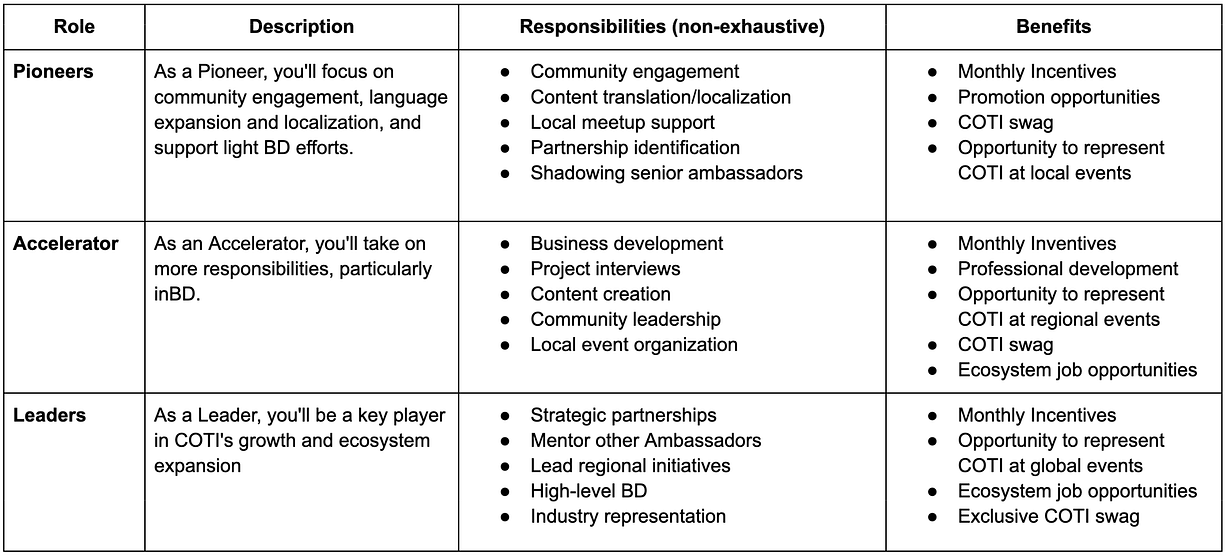
The program introduces three tiers, each representing increasing levels of responsibility and opportunity:

<figure><img src="https://miro.medium.com/v2/resize:fit:1225/1*fD1WDKDHFubljc1BXiB5LA.png" alt="" height="318" width="700"><figcaption></figcaption></figure>

Our tiered approach ensures clear progression paths while recognizing and rewarding contributions at every level. Ambassadors can advance through dedication, achievement, and consistent positive impact on the ecosystem.

## Ambassador Growth Opportunities and Evaluation <a href="#e851" id="e851"></a>

The COTI Ambassador program offers clear paths for advancement through dedication and achievement. Pioneers have the opportunity to advance to Accelerators, and Accelerators to Leaders. Performance is evaluated through a combination of documented achievements, peer feedback, and measurable impact on the ecosystem. We use industry-standard tools to track contributions and maintain transparency in the evaluation process. Business development success, community growth, and leadership qualities are key factors in advancement decisions.

Candidates with significant experience in Web3, business development, or community leadership may qualify to enter directly at the Accelerator tier.

## How to Join the COTI Ambassador Program <a href="#fa7e" id="fa7e"></a>

Applications are now [OPEN](https://coti.io/ambassador)\
We welcome applicants with a range of the following skills:

* Strong understanding of blockchain and privacy technology
* Business development experience (especially for higher tiers)
* Fluency in strategically important languages
* Active involvement in Web3 communities
* Professional communication skills

For more information, search for Ambassador in our [help center](https://coti.io/help-center) here.


# Builders Program

{% hint style="info" %}
There is a quick start guide for developers at <https://docs.coti.io>
{% endhint %}

{% hint style="info" %}
You can find RFPs here: <https://github.com/coti-io/coti-grants>\
\
Click on the arrow next to the green circle\
![](https://1669873050-files.gitbook.io/~/files/v0/b/gitbook-x-prod.appspot.com/o/spaces%2Fbb9VxoqAgZO2p5RjTuh9%2Fuploads%2F6W1jJETekkohLwgQJHL0%2Fimage.png?alt=media\&token=ec99576a-33d7-463e-8595-d6d712de0c03)
{% endhint %}

COTI has launched devnet for its privacy-centric Ethereum layer 2. We are now searching for design partners, developer teams as well as individual developers to build and integrate into COTI V2.

COTI V2 is the fastest and lightest confidentiality layer on Ethereum. Powered by the breakthrough cryptographic protocol Garbled Circuits and secured by Ethereum, COTI introduces the most advanced solution for data protection on the public blockchain. Paving the way for the next wave of Web3 innovation and adoption, COTI unlocks a whole new world of use cases, including confidential transactions, machine learning, DeFi, decentralized identification, and more. The COTI foundation has announced a $40M fund to boost the growth of the COTI V2 ecosystem

\- We want to understand our partners' needs and build the network upon the exact features required to support the next generation of transactions within their existing dApps.

\- The selected partners will be pioneers and early adopters in the race of the fast-evolving world of privacy-preserving blockchains, onboarding new users and tapping into the vast and engaged community of the COTI foundation.

\- Design partnerships will be dedicatedly funded by the COTI foundation and campaigned by both teams' marketing experts.

\- Existing protocols who would like to deploy their dApps on COTI V2 as well as developer teams or individual developers are also welcome to apply.

\- You can apply for the COTI Builders Program and receive grants ranging from $1,000 to $100,000+.

General information about <mark style="color:yellow;">**COTI:**</mark>

| <p>Website: <a href="https://coti.io"><https://coti.io></a></p><p> </p><p>COTI V2 presentation: <a href="https://drive.google.com/file/d/1hRelgch5nY8zoMjabVElzaCC0RRYNENL/view?usp=sharing"><https://drive.google.com/file/d/1hRelgch5nY8zoMjabVElzaCC0RRYNENL/view?usp=sharing></a></p><p> </p><p>X/Twitter: <a href="https://twitter.com/COTInetwork"><https://twitter.com/COTInetwork></a></p><p> </p><p>COTI on Coinmarketcap: <a href="https://coinmarketcap.com/currencies/coti/"><https://coinmarketcap.com/currencies/coti/></a></p> |
| --------------------------------------------------------------------------------------------------------------------------------------------------------------------------------------------------------------------------------------------------------------------------------------------------------------------------------------------------------------------------------------------------------------------------------------------------------------------------------------------------------------------------------------------- |

Here is everything you need for <mark style="color:yellow;">**building**</mark>:

| <p>Full announcement: <a href="https://medium.com/cotinetwork/coti-v2-developer-network-is-live-a-new-era-of-high-speed-lightweight-blockchain-privacy-4b0b04fd72bf"><https://medium.com/cotinetwork/coti-v2-developer-network-is-live-a-new-era-of-high-speed-lightweight-blockchain-privacy-4b0b04fd72bf></a></p><p> </p><p>Start to build / COTI V2 Documentation: <a href="https://docs.coti.io/coti-v2-documentation"><https://docs.coti.io/coti-v2-documentation></a></p><p> </p><p>Typescript SDK: <a href="https://github.com/coti-io/coti-sdk-typescript"><https://github.com/coti-io/coti-sdk-typescript></a></p><p> </p><p>Python SDK: <a href="https://github.com/coti-io/coti-sdk-typescript"><https://github.com/coti-io/coti-sdk-typescript></a></p><p> </p><p>Faucet to cover on-chain gas fees: <a href="https://discord.com/channels/386571547508473876/1235539223595978752"><https://discord.com/channels/386571547508473876/1235539223595978752></a></p><p> </p><p>Explorer: <a href="https://explorer-devnet.coti.io/overview"><https://explorer-devnet.coti.io/overview></a></p><p> </p><p>Local blockchain development environment (Hardhat): <a href="https://github.com/coti-io/confidentiality-contracts"><https://github.com/coti-io/confidentiality-contracts></a></p><p> </p> |
| ---------------------------------------------------------------------------------------------------------------------------------------------------------------------------------------------------------------------------------------------------------------------------------------------------------------------------------------------------------------------------------------------------------------------------------------------------------------------------------------------------------------------------------------------------------------------------------------------------------------------------------------------------------------------------------------------------------------------------------------------------------------------------------------------------------------------------------------------------------------------------------------------------------------------------------------------------------------------------------------------------------------------------------------------------------------------------------------------------------------------------------------------------------------------------------------------------------------------------------------------------------------------------------------------------------- |

And this is the information you need for applying for the <mark style="color:yellow;">**COTI builder program:**</mark>

| <p>COTI Builder program: <a href="https://cotinetwork.notion.site/Overview-COTI-Builders-Program-f742a22ff8ef4e648935362b9b4a9c34"><https://cotinetwork.notion.site/Overview-COTI-Builders-Program-f742a22ff8ef4e648935362b9b4a9c34></a></p><p> </p><p>Submission guide: <a href="https://cotinetwork.notion.site/Application-Submission-Guide-COTI-Builders-Program-5027ee5af62b4665b75bd818e04ae68b"><https://cotinetwork.notion.site/Application-Submission-Guide-COTI-Builders-Program-5027ee5af62b4665b75bd818e04ae68b></a></p><p> </p><p>COTI Builders Program Grant Application: <a href="https://share.hsforms.com/1Boe4wRQtShet_lfl2Z-nLArddfz"><https://share.hsforms.com/1Boe4wRQtShet_lfl2Z-nLArddfz></a></p><p> </p> |
| --------------------------------------------------------------------------------------------------------------------------------------------------------------------------------------------------------------------------------------------------------------------------------------------------------------------------------------------------------------------------------------------------------------------------------------------------------------------------------------------------------------------------------------------------------------------------------------------------------------------------------------------------------------------------------------------------------------------------------- |

If there are any questions or if you need any help, please contact Stefan/COTI Unity Node:

| <p>E-mail: <a href="mailto:cotiunitynode@gmail.com"><cotiunitynode@gmail.com></a></p><p> </p><p>X/Twitter: <a href="https://twitter.com/CotiUnityNode"><https://twitter.com/CotiUnityNode></a></p><p> </p><p>Telegram: <a href="https://t.me/cotiunitynode"><https://t.me/cotiunitynode></a></p><p> </p><p>Discord: <a href="https://discord.com/invite/wfAQfbc3Df"><https://discord.com/invite/wfAQfbc3Df></a></p><p> </p> |
| --------------------------------------------------------------------------------------------------------------------------------------------------------------------------------------------------------------------------------------------------------------------------------------------------------------------------------------------------------------------------------------------------------------------------- |


# Creators Program

The Creators program incentivizes the growth of the COTI community through high-impact content creation.

Both individuals and entities can apply for grants consisting of COTI tokens to fund your content creation activities.

You can find more details on the allocated COTI tokens per content type [on this page here.](https://www.notion.so/cotinetwork/Overview-COTI-Creators-Program-584b0db541a348b4aa7f5d14c897289c?pvs=4)

The type of content we’re looking for to be created consists of, but is not limited to:

* **Explainer Videos**: Create whiteboard videos, educational videos, tutorial videos of how to build on top of the COTI V2 developer network, and more.
* **Short-form Videos:** Create short videos about COTI to be shared on YouTube, X, TikTok and other social media platforms.
* **Newsletters**: Create and distribute an unofficial COTI newsletter covering the latest developments in the COTI ecosystem.
* **Articles:** Write articles about industry comparisons, tutorials, use cases, deep dives into privacy in Web3, and COTI’s role in Web3 privacy, etc.
* **Infographics:** Design infographics to visually explain COTI’s tech stack, ecosystem, use-cases or any other initiative or idea you may have.
* **COTI** **Content Aggregator** — Manage and promote a dedicated platform or account that aggregates and highlights existing content about COTI.
* **Discord and Telegram Bots:** Create and deploy bots useful to the COTI community, such as bots dedicated to share data and information about COTI, or to increase engagement in the COTI community.
* **Podcast**: Host a podcast series discussing blockchain privacy trends, featuring interviews with experts and COTI team members.
* **Translation and Localization**: Translate COTI’s materials (such as white paper, decks, etc) into languages such as Mandarin, Korean, Japanese, and more. Produce non-English explainer videos, provide voice overs for existing videos, and more.
* **Research:** Conduct academic and non-academic research on COTI’s technology and use cases.

We highly encourage those with a high follower count and access to large distribution channels to apply. We’re also allocating a bonus to creators whose content becomes popular and receives high engagement as described [here](https://www.notion.so/cotinetwork/Overview-COTI-Creators-Program-584b0db541a348b4aa7f5d14c897289c?pvs=4). You’ll easily spot these special tasks on Notion with a distinctive marking.

These are just a couple examples, your creativity is the limit! You can see more examples[ on this page.](https://www.notion.so/cotinetwork/Overview-COTI-Creators-Program-584b0db541a348b4aa7f5d14c897289c?pvs=4)

### How to participate in the COTI Creators program <a href="#id-53fd" id="id-53fd"></a>

To participate in the Creators program, please[ fill in this form,](https://share.hsforms.com/17qHRWrS4TjqFOFE-LqGWxQrddfz) where you will be asked for:

* Your email address
* Telegram handle and / or X handle
* Content category (Video, infographic, article, translation, etc.)
* What goal does your content achieve? (awareness, educational, simplifying explanations, art, etc)
* Amount requested and justification (costs, time, software etc)
* Timeline — by when you expect it to be ready
* How do you expect to amplify your content? (follower count, distribution channels)

### Criteria of the COTI Creators Program <a href="#aaf6" id="aaf6"></a>

To judge each application, there will be a committee composed of team and community members.

At a high level we’ll be judging each submission according to accuracy and creativity. But as is the case with content, a lot will be subjective, specific to the content type, and judged on a case by case basis.

But here are a couple tips when making COTI content you should take into account:

* Be creative and original
* Be accurate and informative
* Don’t speculate on COTI token price
* Always use high visual and audio quality
* Respect intellectual property and copyright
* Don’t create polarizing or offensive content


# Contact and Channels


# Official Contact

These are the official COTI communication channels:

* Website: <https://coti.io/>
* Telegram: <https://t.me/COTInetwork>
* Twitter: <https://twitter.com/COTInetwork>
* Discord: <https://discord.com/invite/wfAQfbc3Df>
* Github: <https://github.com/coti-io>
* Youtube: <https://www.youtube.com/@COTIGroup>

{% hint style="danger" %}
Beware of scammers! Admins and the COTI team will never contact you first. Don't reply to direct messages offering you support! Scammers may ask for your seed phrase or to "reconnect" your wallet on a website which will result in your wallet being hacked and your funds being stolen.
{% endhint %}


# Unofficial Channels and Bots

Unofficial Channels on Telegram:

* COTI Confidential: <https://t.me/COTIconfidential>
* COTI - Trading & Community Group (unofficial): <https://t.me/COTItrading>
* gCOTI - Trading & Community Group (Unofficial): <https://t.me/GcotiTrading>
* COTI D-A-CH (unofficial/deutsch): <https://t.me/COTI_D_A_CH>

{% hint style="danger" %}
Beware of scammers! Admins and the COTI team will never contact you first. Don't reply to direct messages offering you support! Scammers may ask for your seed phrase or to "reconnect" your wallet on a website which will result in your wallet being hacked and your funds being stolen.
{% endhint %}

Telegram Bots:

* COTI Community Bot: <https://t.me/coticomm_bot>


# COTI Tokenomics

{% hint style="info" %}
Get all the information about COTI V2 in detail here: \
\
<https://medium.com/cotinetwork/how-coti-is-gearing-up-for-2024-and-beyond-e0d465794767#400d>
{% endhint %}

In order to fully realize the potential of the network, a native token is essential. This token serves as the lifeblood of the ecosystem, facilitating transactions, securing the network, incentivizing nodes, and providing the means to access and utilize the advanced privacy features of COTI.

COTI recognizes a great value proposition both for COTI holders and to the COTI V2 future community in retaining the token’s central position in the new economy, enabling it to grow in importance and relevance as the network’s capabilities expand and **the old token can be transferred 1:1 to COTI V2.**

In the new network, transaction fees paid in $COTI will be aggregated into a dedicated Treasury. This Treasury, overseen by the community and governed by *gCOTI holders*, will exercise governance over the allocation of these fees. The community’s decisions will determine whether to allocate these fees as additional rewards to participants within the network or to enact a deflationary measure by burning them.

COTI V2 will be supported by the newly created COTI Foundation and its Ecosystem Fund.

The new tokenomics of the supply in addition to the initial 2,000,000,000 COTI tokens (the total supply will be both inflationary and deflationary):

|                                                                                                                                                                                                                                                                                                                                                                                                                                                                                                                             |     |
| --------------------------------------------------------------------------------------------------------------------------------------------------------------------------------------------------------------------------------------------------------------------------------------------------------------------------------------------------------------------------------------------------------------------------------------------------------------------------------------------------------------------------- | --- |
| Rewards, incentives and airdrops: The biggest share of the newly created tokens will be dedicated to reward holders, stakers and potentially validators as well as other network participants, encouraging active participation and securing the network. The initial recipients of this allocation will be the existing holders which will hold 100% of the supply when the network will be launched. even after 10 years when total supply can grow by 50%, **the existing holders will still retain 85% of the supply!** | 58% |
| Development: Another portion will be earmarked for development efforts, ensuring the continuous improvement, innovation, and scalability of the COTI V2 ecosystem.                                                                                                                                                                                                                                                                                                                                                          | 18% |
| Ecosystem: Designated to the COTI Foundation allowing it to support various initiatives, including grants for developers and dApps, incentive programs, strategic investments and liquidity provisions.                                                                                                                                                                                                                                                                                                                     | 24% |

<figure><img src="https://1669873050-files.gitbook.io/~/files/v0/b/gitbook-x-prod.appspot.com/o/spaces%2Fbb9VxoqAgZO2p5RjTuh9%2Fuploads%2FrPA7aGdTCSphubIewiUR%2Fimage.png?alt=media&amp;token=fe0529ba-2b88-41b9-b3ef-da5b5347bbe2" alt=""><figcaption></figcaption></figure>


# Bridge and ERC20 COTI


# ERC20 COTI

If you want to add ERC20 COTI on the Ethereum network, use the following information when adding it as a custom token:

* Ticker:  COTI
* Contract: 0xDDB3422497E61e13543BeA06989C0789117555c5
* Decimals: 18

<figure><img src="https://1669873050-files.gitbook.io/~/files/v0/b/gitbook-x-prod.appspot.com/o/spaces%2Fbb9VxoqAgZO2p5RjTuh9%2Fuploads%2FyisdtvsNmeLTlUlelSeQ%2Fimage.png?alt=media&amp;token=ed6e292f-b720-4a5e-a6fe-cee9b4e3c18d" alt=""><figcaption></figcaption></figure>


# Bridge: V1 -> V2

{% embed url="<https://www.youtube.com/watch?v=ighnx4Gxk8Q>" %}


# Bridge: Native V2 <--> ERC20

You can transfer native COTI to Ethereum by using the COTI bridge 2.0.

{% hint style="info" %}
Please pay attention to the displayed limits that are shown while using the bridge.
{% endhint %}

{% embed url="<https://www.youtube.com/watch?t=64s&v=SwMWpRf8vPE>" %}


# Treasury: General Information

COTI’s treasury is a pool of COTI where users can deposit COTI and are rewarded for their participation.&#x20;

The pool grows over time as the entire ecosystem pays fees, directly or indirectly, to the treasury.

The treasury is completely flexible and users are free to decide on how they want to participate and be rewarded. Using the treasury, users will be able to decide exactly how much they want to stake, for how long and even adjust their leverage and risk level - all of which will determine the user’s specific reward and APY (APY is dynamic and will, apart from the user deposit decesions, depend on the totoal amount of COTI deposited in the treasury and the fees collected in the COTI ecosystem).

<figure><img src="https://1669873050-files.gitbook.io/~/files/v0/b/gitbook-x-prod.appspot.com/o/spaces%2Fbb9VxoqAgZO2p5RjTuh9%2Fuploads%2F2XemiJMnXc7Crlr5B71v%2FTwitter%20COTI%20Treasury.png?alt=media&amp;token=55e68a14-de8e-4842-bb60-4054ccdd7c4c" alt=""><figcaption></figcaption></figure>

{% hint style="info" %}
You can find detailed information about the treasury at <https://coti.io/files/treasury2.0_lp.pdf> and <https://medium.com/cotinetwork/everything-you-need-to-know-about-the-coti-treasury-b5fd09e1d82a#b3ec>
{% endhint %}


# Treasury deposits


# Deposit COTI

*At the end of this page you will find video tutorials on making and managing deposits.*

{% hint style="info" %}
You can boost the APY of your deposit by depositing [gCOTI](/gcoti/utility/gcoti-apy-boost).
{% endhint %}

{% hint style="danger" %}
If you use a multiplier (2x, 3x, 4x or 8x), you will have to watch your health factor closely! Once the health factor of your deposit drops below 1.0, your deposit will be liquidated immediately. 1x is always risk free.
{% endhint %}

1.) At [https://treasury.coti.io](https://treasury.coti.io/) click on "Enter Treasury", agree to the terms and conditions, select either the COTI network (for native COTI/gCOTI) or the Ethereum network (for ERC20 COTI/gCOTI)

<div align="left"><figure><img src="https://1669873050-files.gitbook.io/~/files/v0/b/gitbook-x-prod.appspot.com/o/spaces%2Fbb9VxoqAgZO2p5RjTuh9%2Fuploads%2FQqzlTRV38c8MngOg4jsN%2Fimage.png?alt=media&amp;token=69992dd4-6fe1-4760-9314-47b353423c69" alt="" width="196"><figcaption></figcaption></figure></div>

<div align="left"><figure><img src="https://1669873050-files.gitbook.io/~/files/v0/b/gitbook-x-prod.appspot.com/o/spaces%2Fbb9VxoqAgZO2p5RjTuh9%2Fuploads%2FoYucb9cX2o40T4AvUFZs%2Fimage.png?alt=media&amp;token=4adaf560-bd4b-41ee-9526-d12fe1a222fe" alt=""><figcaption></figcaption></figure></div>

2.) Click on "New Deposit" or on "Manage" next to an existing deposit if you want to top it up.

![](https://1669873050-files.gitbook.io/~/files/v0/b/gitbook-x-prod.appspot.com/o/spaces%2Fbb9VxoqAgZO2p5RjTuh9%2Fuploads%2F8nbyLl8WcVIutGhlaGYV%2Fimage.png?alt=media\&token=16693157-2199-4758-8e7b-2308f3972a49)

<figure><img src="https://1669873050-files.gitbook.io/~/files/v0/b/gitbook-x-prod.appspot.com/o/spaces%2Fbb9VxoqAgZO2p5RjTuh9%2Fuploads%2FKNmp3WxjrZBDIaE3FqrC%2Fimage.png?alt=media&amp;token=95d57a3f-7eb4-48c8-be80-041babaac4dc" alt=""><figcaption></figcaption></figure>

3.) Choose from which of your addresses you would like to deposit COTI in the treasury.

<figure><img src="https://1669873050-files.gitbook.io/~/files/v0/b/gitbook-x-prod.appspot.com/o/spaces%2Fbb9VxoqAgZO2p5RjTuh9%2Fuploads%2FCksIWitaIuuLXj2KIiBE%2Fimage.png?alt=media&amp;token=86e8c3de-363d-4f1c-820e-6fb07587612c" alt=""><figcaption></figcaption></figure>

4.) Enter the amount of COTI you would like to deposit.

<figure><img src="https://1669873050-files.gitbook.io/~/files/v0/b/gitbook-x-prod.appspot.com/o/spaces%2Fbb9VxoqAgZO2p5RjTuh9%2Fuploads%2F4VJ5WoF32kq3ehFUUCeg%2Fimage.png?alt=media&amp;token=7f27e3e8-d8d5-4926-8f0e-7913c4e940e8" alt=""><figcaption></figcaption></figure>

Alternatively you can choose which percentage of your funds you would like to deposit in the treasury.

<figure><img src="https://1669873050-files.gitbook.io/~/files/v0/b/gitbook-x-prod.appspot.com/o/spaces%2Fbb9VxoqAgZO2p5RjTuh9%2Fuploads%2FgcII1Yvo4dvPtyd7jbbD%2Fimage.png?alt=media&amp;token=bb607a4f-ec32-46de-84e5-fc16e80c93c3" alt=""><figcaption></figcaption></figure>

5.) You can choose whether the entered amount should alread include fees by clicking the box.

![](https://1669873050-files.gitbook.io/~/files/v0/b/gitbook-x-prod.appspot.com/o/spaces%2Fbb9VxoqAgZO2p5RjTuh9%2Fuploads%2FlqpTgrIDHbbTa2fqIXH4%2Fimage.png?alt=media\&token=7642e1ae-c1e2-4855-ab19-c59864d65984)

6.) OPTIONAL: Choose a multiplier. By doing this the APY for your deposit will increase.

{% hint style="danger" %} <mark style="color:red;">**Using the multiplier is associated with risk - you can lose your entire deposit.**</mark> <mark style="color:green;">**Only 1x multiplier is risk free.**</mark>&#x20;

If you use a 2x, 3x, 4x or 8x multiplier, a **health factor** will show up next to your deposit. It increases and decreases with COTI's market price.&#x20;

* <mark style="color:red;">**If your health factor drops below 1.0, the deposit will be liquidated immediately**</mark> and will then be sent to the treasury and distributed as treasury rewards.
* If your health factor drops below 1.3 you will get a liquidation warning (yellow).
* A deposit with a health factor of more than 1.3 is considered a healthy deposit (green).

<mark style="color:yellow;">**If your deposit is at risk of being liquidated, you can take a proactive action in order to reduce the liquidation risk by depositing additional COTI or end your deposit by**</mark> [**withdrawing**](/treasury/treasury-deposits/withdraw-coti) <mark style="color:yellow;">**it (note that**</mark> [**fees**](/treasury/treasury-fees) <mark style="color:yellow;">**will apply).**</mark>&#x20;

Also note that using a 2x, 3x, 4x or 8x multiplier comes with additional [treasury fees](/treasury/treasury-fees)**.**

If you are not familiar with the risks of leverage, the risk free 1x multiplier may be the best option for you.&#x20;
{% endhint %}

7.) Choose your locking period. The longer you lock your funds the higher the APY. Withdrawing a locked deposid before the end of the locking period comes with additional [treasury fees](/treasury/treasury-fees). If you choose "Unlocked" you can withdraw your funds anytime after having them at least for 5 minutes (=minimal engagement period) in the treasury.

<figure><img src="https://1669873050-files.gitbook.io/~/files/v0/b/gitbook-x-prod.appspot.com/o/spaces%2Fbb9VxoqAgZO2p5RjTuh9%2Fuploads%2FAvoZWii4DEtRtiaNPTRX%2Fimage.png?alt=media&amp;token=7b2a2326-9f5d-4a97-b352-cd640907d762" alt=""><figcaption></figcaption></figure>

8.) You can choose to extend the locking period automatically. Example: A 120 day locking period is extended automaticall by another 120 days once the locking period has ended.

<figure><img src="https://1669873050-files.gitbook.io/~/files/v0/b/gitbook-x-prod.appspot.com/o/spaces%2Fbb9VxoqAgZO2p5RjTuh9%2Fuploads%2F57paR2DDvtgPap6jIxYH%2Fimage.png?alt=media&amp;token=74518cd5-36f9-42d5-96cc-9d00d6012541" alt=""><figcaption></figcaption></figure>

9.) You will get a summary of your deposit. Check it and then click on "I agree to all terms & services" (that you should read at least once) and on "New Deposit".

![](https://1669873050-files.gitbook.io/~/files/v0/b/gitbook-x-prod.appspot.com/o/spaces%2Fbb9VxoqAgZO2p5RjTuh9%2Fuploads%2FEQ4EU6WP46h9ZPZgRn5U%2Fimage.png?alt=media\&token=b1cdd411-1520-4d03-aff6-8b561d0c008f)

{% embed url="<https://www.youtube.com/watch?v=QXayGW--jY8>" %}

{% embed url="<https://www.youtube.com/watch?v=ywG7xXj8VTA>" %}


# Withdraw COTI

You can withdraw your enitre deposit/rewards or part of your deposit/rewards at any time. (For more information on fees check [Treasury Fees](/treasury/treasury-fees).) If you withdraw the entire deposit balance, your accumulated rewards will be automatically withdrawn and your deposit will be closed.&#x20;

{% hint style="info" %}
Please note that <mark style="color:yellow;">**withdrawing a deposit when it is within an active lock period**</mark> <mark style="color:yellow;">**will be subjected to a differential early withdrawal fee**</mark> calculated based on the remaining lock time (2% max). This fee will be reduced based on the elapsed time since the beginning of the lock period. All rewards accumulated during the active lock period will be liquidated and distributed as rewards in the Treasury. If you claim all your rewards and then decide to make a withdrawal while the deposit lock period is active, the platform will deduct the amount of the claimed rewards during the active lock period from the withdrawn deposit along with fees and an early withdrawal fine.
{% endhint %}

{% hint style="info" %}
If the APY boost of a deposit is at its maximum and you decide to withdraw COTI, an equivalent amount of gCOTI will also be withdrawn from the deposit. For example, if the APY boost is at its maximum in a deposit and you withdraw 50% of the COTI in the deposit, 50% of the gCOTI in the deposit are withdrawn as well.

gCOTI however can always be withdrawn without withdrawing COTI with it.

Overall there must always be an equal amount or more COTI than gCOTI in a deposit.
{% endhint %}

1.) At <https://treasury.coti.io> click on "Enter Treasury", agree to the terms and conditions, select either the COTI network (for native COTI/gCOTI) or the Ethereum network (for ERC20 COTI/gCOTI)

<div align="left"><figure><img src="https://1669873050-files.gitbook.io/~/files/v0/b/gitbook-x-prod.appspot.com/o/spaces%2Fbb9VxoqAgZO2p5RjTuh9%2Fuploads%2FQqzlTRV38c8MngOg4jsN%2Fimage.png?alt=media&amp;token=69992dd4-6fe1-4760-9314-47b353423c69" alt="" width="196"><figcaption></figcaption></figure></div>

<div align="left"><figure><img src="https://1669873050-files.gitbook.io/~/files/v0/b/gitbook-x-prod.appspot.com/o/spaces%2Fbb9VxoqAgZO2p5RjTuh9%2Fuploads%2FoYucb9cX2o40T4AvUFZs%2Fimage.png?alt=media&amp;token=4adaf560-bd4b-41ee-9526-d12fe1a222fe" alt=""><figcaption></figcaption></figure></div>

2.) Next to the the deposit you would like to withdraw click on "Manage".

<figure><img src="https://1669873050-files.gitbook.io/~/files/v0/b/gitbook-x-prod.appspot.com/o/spaces%2Fbb9VxoqAgZO2p5RjTuh9%2Fuploads%2FiXI5gOu9uIDysq1xCWuL%2Fimage.png?alt=media&amp;token=1d6e7f34-4f29-4b6d-b3c2-a3b29f6e82ce" alt=""><figcaption></figcaption></figure>

3.) If you only want to withdraw (parts of) your Rewards click "Rewards" if you would like to withdraw the entire deposit or parts of your deposit click on "Withdraw"

![](https://1669873050-files.gitbook.io/~/files/v0/b/gitbook-x-prod.appspot.com/o/spaces%2Fbb9VxoqAgZO2p5RjTuh9%2Fuploads%2FBhOleJLtphQiz9nZMACm%2Fimage.png?alt=media\&token=00c9022c-4076-4b0e-92b8-6f45583eb3f8)

![](https://1669873050-files.gitbook.io/~/files/v0/b/gitbook-x-prod.appspot.com/o/spaces%2Fbb9VxoqAgZO2p5RjTuh9%2Fuploads%2FpsivHZQ2DrnMqMxCOsW1%2Fimage.png?alt=media\&token=cdb7088a-28ea-4013-9209-6451d197e430)

4.) Enter the amount or percentage of your rewards/deposit you would like to withdraw.

![](https://1669873050-files.gitbook.io/~/files/v0/b/gitbook-x-prod.appspot.com/o/spaces%2Fbb9VxoqAgZO2p5RjTuh9%2Fuploads%2FA4nE7V8KywvwMyCUjz89%2Fimage.png?alt=media\&token=f673ebe5-b82c-44ea-b5ae-ebc009da16aa)

5.) Choose which address the funds should be sent to:

![](https://1669873050-files.gitbook.io/~/files/v0/b/gitbook-x-prod.appspot.com/o/spaces%2Fbb9VxoqAgZO2p5RjTuh9%2Fuploads%2FcQQPkB7mI5BiUViC3hh6%2Fimage.png?alt=media\&token=2e59bb74-4e86-4255-b332-a0e9b25a26be)

6.) You will receive a summary of the rewards/the withdrawal including all fees and the final amount you will receive.

![](https://1669873050-files.gitbook.io/~/files/v0/b/gitbook-x-prod.appspot.com/o/spaces%2Fbb9VxoqAgZO2p5RjTuh9%2Fuploads%2Fw8FIhH5PBgrn5No1OcpT%2Fimage.png?alt=media\&token=a18ce4c1-6feb-486b-b511-9c3046d8b9f3)

7.) Finally click on "Claim" / "Withdraw".


# Deposit gCOTI

{% hint style="warning" %}
You will need a small amount of gCOTI for [transaction fees](broken://pages/GpZPzQm6J1sbPyS74Xrm), so you can't use 100% of your gCOTI. If your transaction can't be confirmed, try to enter a slightly smaller amount of gCOTI.\
\
You should also keep some COTI in your COTI Viper Wallet as a small amount is also needed for transaction fees.
{% endhint %}

1.) At <https://treasury.coti.io> click on "Enter Treasury", agree to the terms and conditions, select either the COTI network (for native COTI/gCOTI) or the Ethereum network (for ERC20 COTI/gCOTI)

<div align="left"><figure><img src="https://1669873050-files.gitbook.io/~/files/v0/b/gitbook-x-prod.appspot.com/o/spaces%2Fbb9VxoqAgZO2p5RjTuh9%2Fuploads%2FQqzlTRV38c8MngOg4jsN%2Fimage.png?alt=media&amp;token=69992dd4-6fe1-4760-9314-47b353423c69" alt="" width="196"><figcaption></figcaption></figure></div>

<div align="left"><figure><img src="https://1669873050-files.gitbook.io/~/files/v0/b/gitbook-x-prod.appspot.com/o/spaces%2Fbb9VxoqAgZO2p5RjTuh9%2Fuploads%2FoYucb9cX2o40T4AvUFZs%2Fimage.png?alt=media&amp;token=4adaf560-bd4b-41ee-9526-d12fe1a222fe" alt=""><figcaption></figcaption></figure></div>

2.) Next to the deposit you would like to add gCOTI to click on "Manage"

![](https://1669873050-files.gitbook.io/~/files/v0/b/gitbook-x-prod.appspot.com/o/spaces%2Fbb9VxoqAgZO2p5RjTuh9%2Fuploads%2F5iIBeEcpnoiTXfOAZTcA%2Fimage.png?alt=media\&token=04fb9b04-33c2-4b89-9f11-c194f922bd6c)

3.) Click on "APY Boost"

![](https://1669873050-files.gitbook.io/~/files/v0/b/gitbook-x-prod.appspot.com/o/spaces%2Fbb9VxoqAgZO2p5RjTuh9%2Fuploads%2FmJ4fK0B1f7EmoaDf8DYL%2Fimage.png?alt=media\&token=63408ef8-c573-4e74-be3c-fac09843aa4e)

4.) Select an Adress holding gCOTi in the field "From".

<div align="left"><figure><img src="https://1669873050-files.gitbook.io/~/files/v0/b/gitbook-x-prod.appspot.com/o/spaces%2Fbb9VxoqAgZO2p5RjTuh9%2Fuploads%2Fe6JqBtrU63tpYHXq9rNS%2Fimage.png?alt=media&amp;token=391b92f8-acb1-4fd9-872b-0225f4e11be5" alt=""><figcaption></figcaption></figure></div>

5.) Select an adress in the field "Select fee source"

<div align="left"><figure><img src="https://1669873050-files.gitbook.io/~/files/v0/b/gitbook-x-prod.appspot.com/o/spaces%2Fbb9VxoqAgZO2p5RjTuh9%2Fuploads%2Fm2C9lD43hJQeifzwHXdD%2Fimage.png?alt=media&amp;token=628f751f-e3d2-4097-bc92-8ff74b3a2337" alt=""><figcaption></figcaption></figure></div>

6.) Type in the amount of gCOTI. <mark style="color:green;">For gCOTI there is no liquidation risk, no locking period and no multipliers.</mark> It is only used to boost the APY of COTI deposits.

<div align="left"><figure><img src="https://1669873050-files.gitbook.io/~/files/v0/b/gitbook-x-prod.appspot.com/o/spaces%2Fbb9VxoqAgZO2p5RjTuh9%2Fuploads%2FxrnwCZhVLGIsZBuSj7VU%2Fimage.png?alt=media&amp;token=141144ce-a52e-495a-a51f-7b67714434c0" alt=""><figcaption></figcaption></figure></div>

You can only deposit a maximum amout of gCOTI that equals the amount of COTI in the deposit (in this example 1,000).

Alternatively, you can use the slider to choose the amount of gCOTI.

<div align="left"><figure><img src="https://1669873050-files.gitbook.io/~/files/v0/b/gitbook-x-prod.appspot.com/o/spaces%2Fbb9VxoqAgZO2p5RjTuh9%2Fuploads%2FyYR3mXFVykeDIWItVMk0%2Fimage.png?alt=media&amp;token=93bb316f-da9e-495e-b8a8-d6c4c2b08684" alt=""><figcaption></figcaption></figure></div>

7.) Check the summary on the right (the numbers in this example are for demonstration purposes only - for an actual APY boost estimate use the [gCOTI APY boost calculator](https://www.calconic.com/calculator-widgets/gcoti-apy-boost-calculator/649db7b7ead654001e7fd6ca?layouts=true)).

![](https://1669873050-files.gitbook.io/~/files/v0/b/gitbook-x-prod.appspot.com/o/spaces%2Fbb9VxoqAgZO2p5RjTuh9%2Fuploads%2FyV4LMex2OTcSJvqWCwuI%2Fimage.png?alt=media\&token=bc88c0cb-a115-4977-b952-65bf4e053781)

8.) Finally click on "Boost".

<div align="left"><figure><img src="https://1669873050-files.gitbook.io/~/files/v0/b/gitbook-x-prod.appspot.com/o/spaces%2Fbb9VxoqAgZO2p5RjTuh9%2Fuploads%2FHhezPVYjRsYHpTNXShNR%2Fimage.png?alt=media&amp;token=f98c217b-9365-4861-9d64-56cdc30ddb6d" alt=""><figcaption></figcaption></figure></div>

9.) After the transaction has completed you can see your APY boost.

<div align="left"><figure><img src="https://1669873050-files.gitbook.io/~/files/v0/b/gitbook-x-prod.appspot.com/o/spaces%2Fbb9VxoqAgZO2p5RjTuh9%2Fuploads%2FtiSEOhdXzKqonkZEwX8S%2Fimage.png?alt=media&amp;token=18d22b3a-acef-436a-92f4-b775f075da67" alt=""><figcaption></figcaption></figure></div>

{% embed url="<https://www.youtube.com/watch?t=&v=lAkfKPpfsvY>" %}


# Withdraw gCOTI

{% hint style="info" %}
If the APY boost of a deposit is at its maximum and you decide to withdraw COTI, an equivalent amount of gCOTI will also be withdrawn from the deposit. For example, if the APY boost is at its maximum in a deposit and you withdraw 50% of the COTI in the deposit, 50% of the gCOTI in the deposit are withdrawn as well.

gCOTI however can always be withdrawn without withdrawing COTI with it.

Overall there must always be an equal amount or more COTI than gCOTI in a deposit.
{% endhint %}

1.) At <https://treasury.coti.io> click on "Enter Treasury", agree to the terms and conditions, select either the COTI network (for native COTI/gCOTI) or the Ethereum network (for ERC20 COTI/gCOTI)

<div align="left"><figure><img src="https://1669873050-files.gitbook.io/~/files/v0/b/gitbook-x-prod.appspot.com/o/spaces%2Fbb9VxoqAgZO2p5RjTuh9%2Fuploads%2FQqzlTRV38c8MngOg4jsN%2Fimage.png?alt=media&amp;token=69992dd4-6fe1-4760-9314-47b353423c69" alt="" width="196"><figcaption></figcaption></figure></div>

<div align="left"><figure><img src="https://1669873050-files.gitbook.io/~/files/v0/b/gitbook-x-prod.appspot.com/o/spaces%2Fbb9VxoqAgZO2p5RjTuh9%2Fuploads%2FoYucb9cX2o40T4AvUFZs%2Fimage.png?alt=media&amp;token=4adaf560-bd4b-41ee-9526-d12fe1a222fe" alt=""><figcaption></figcaption></figure></div>

2.) Next to the deposit including gCOTI click on "Manage"

![](https://1669873050-files.gitbook.io/~/files/v0/b/gitbook-x-prod.appspot.com/o/spaces%2Fbb9VxoqAgZO2p5RjTuh9%2Fuploads%2F5iIBeEcpnoiTXfOAZTcA%2Fimage.png?alt=media\&token=04fb9b04-33c2-4b89-9f11-c194f922bd6c)

3.) Click on "Withdraw"

![](https://1669873050-files.gitbook.io/~/files/v0/b/gitbook-x-prod.appspot.com/o/spaces%2Fbb9VxoqAgZO2p5RjTuh9%2Fuploads%2FrdA3m4Ng46FQ0GNmNP0J%2Fimage.png?alt=media\&token=f2e4bca3-3933-476d-8cb6-a68914753813)

4.) In order to withdraw gCOTI, enter the amount you would like to withdraw or use the slider in the section "APY Boost". (You can also withdraw COTI alongside gCOTI by entering the amount or using the slider in the section "Deposit balance".)

<figure><img src="https://1669873050-files.gitbook.io/~/files/v0/b/gitbook-x-prod.appspot.com/o/spaces%2Fbb9VxoqAgZO2p5RjTuh9%2Fuploads%2Fk4CsJDnIMowLvrsqeueS%2Fimage.png?alt=media&amp;token=468cd99a-ba12-488d-8827-45bff3fbf712" alt=""><figcaption></figcaption></figure>

5.) Check the summary on the right side and click on "Withdraw".

![](https://1669873050-files.gitbook.io/~/files/v0/b/gitbook-x-prod.appspot.com/o/spaces%2Fbb9VxoqAgZO2p5RjTuh9%2Fuploads%2FrnaiAs9sK6AWrZcmUaFm%2Fimage.png?alt=media\&token=1c28b7cd-0caf-4339-8537-f781cc31cfb1)

{% embed url="<https://www.youtube.com/watch?t=&v=lAkfKPpfsvY>" %}


# APY and health factor top up calculator

{% hint style="info" %}
Innuvonode has created calculators that show you treasury APYs and that help you manage the health factor of your deposit:&#x20;

<https://www.innovunode.io/treasury-tools/>

Nebula Tech Venture provides calculators for liquidation price and topping up your deposit:&#x20;

<https://coti.nebula-tech.io/treasury/liquidation-calculator>
{% endhint %}


# gCOTI APY boost

{% hint style="info" %}
1 gCOTI always boosts 1 COTI by base APY \* 16. So it doesn‘t matter in which deposit you add gCOTI. It may be a good idea to add it to the deposit you plan to keep the longest to get the maximum benefit of your gCOTI and to reduce gCOTI deposit/withdrawal fees.
{% endhint %}

When you [deposit gCOTI in the treasury](/gcoti/utility/gcoti-apy-boost/deposit-gcoti), <mark style="color:green;">**gCOTI will provide a boost of up to 1600% on the Treasury Base APY, at a ratio of 1:1**</mark> (each gCOTI will boost the APY of 1 $COTI). You can find the current base APY at <https://www.innovunode.io/treasury-tools/> (treasury's APY: unlocked, 1x). As the maximum ratio is 1:1, users cannot deposit more gCOTI than they have $COTI deposited in the Treasury.

Users can boost the APY of **any** Treasury deposit, new or existing, regardless of the locking period, any multipliers, or if it was part of the gCOTI Airdrop Campaign.

It’s important to note that unlike some $COTI deposits, the deposited gCOTI aren’t locked. Even if they are boosting the APY of locked Treasury deposits, users can withdraw their gCOTI deposits at any time.

Keeping in mind that at any given time, there cannot be more gCOTI than $COTI on a single deposit. This means that if a user decides to withdraw an amount of $COTI from a deposit that is receiving a max APY boost, an equivalent amount of gCOTI will also be withdrawn.

{% hint style="info" %}
Note that the Base APY is dynamic and can change over time.
{% endhint %}


# APY boost calculator

{% hint style="info" %}
This calculator will give you an estimate of your gCOTI APY boost and your final APY as well as the an estimate of the amount of gCOTI needed to reach your personal APY goal (Limited to 500 uses per month, if the website can't be accessed, please download the Excel file below):

<https://www.calconic.com/calculator-widgets/gcoti-apy-boost-calculator/649db7b7ead654001e7fd6ca?layouts=true>

You can also download the following Excel file that contains the calculator:

<https://tinyurl.com/gCOTIAPYcalculator>
{% endhint %}

<figure><img src="https://1669873050-files.gitbook.io/~/files/v0/b/gitbook-x-prod.appspot.com/o/spaces%2Fbb9VxoqAgZO2p5RjTuh9%2Fuploads%2FrUuILFZ28Y3JC8FVMwgX%2Fimage.png?alt=media&amp;token=a3b2f819-7ceb-47a2-9bb0-51a6a3cd273e" alt="" width="563"><figcaption></figcaption></figure>


# Treasury Fees

<mark style="color:yellow;">**Deposit fee**</mark>: 0.05%

<mark style="color:yellow;">**Withdrawal fee**</mark>: 0.25%

<mark style="color:yellow;">**Multiplier fees**</mark> (do not apply for 1x multiplier):

* 2x multiplier: 0.0025% per day
* 3x multiplier: 0.0033% per day
* 4x multiplier: 0.0035% per day
* 8x multiplier: 0.0045% per day

<mark style="color:yellow;">**Early withdrawal fee**</mark> (only for deposits with a locked period): 0% to 2% depending on how early you withdraw your deposit

<mark style="color:yellow;">**Liquidation risk fees**</mark> (are calculated at the time of withdrawal and do not apply for 1x multiplier):

* 2x multiplier with health factor of 1.3 or below: 1% to 3%
* 3x multiplier with health factor of 1.15 or below: 2% to 3%
* 4x multiplier with health factor of 1.1 or below: 2% to 4%
* 8x multiplier with health factor of 1.04 or below: 3% to 5%

{% hint style="info" %}
You can find a detailed explanation of treasury fees at <https://medium.com/cotinetwork/everything-you-need-to-know-about-the-coti-treasury-b5fd09e1d82a>.
{% endhint %}


# gCOTI


# gCOTI Tokenomics

gCOTI is the governance token of the COTI treasury an has certain [utility](/gcoti/utility) within the COTI treasury.

There is a fixed <mark style="color:blue;">**total supply of 1 billion (1,000,000,000) gCoti**</mark> that are distributed as follows:

<table><thead><tr><th width="195"></th><th></th><th data-hidden></th></tr></thead><tbody><tr><td><mark style="color:blue;"><strong>Airdrop campaign</strong></mark></td><td>8.5% to 10% (depending on the amount deposited, the rest will be alocated to the reserve)</td><td></td></tr><tr><td><mark style="color:blue;"><strong>Development</strong></mark></td><td>18% (3 years linear vesting with 6 months cliff)</td><td></td></tr><tr><td><p><mark style="color:blue;"><strong>Treasury/</strong></mark></p><p><mark style="color:blue;"><strong>Community</strong></mark></p></td><td>42% (distributed as APY to Treasury participants 5 years from the completion of the airdrop campaign)</td><td></td></tr><tr><td><mark style="color:blue;"><strong>Reserve</strong></mark></td><td>30% to 31.5% (will be distributed as per governance decision for the benefit of the ecosystem; 2 years cliff)</td><td></td></tr></tbody></table>

<figure><img src="https://1669873050-files.gitbook.io/~/files/v0/b/gitbook-x-prod.appspot.com/o/spaces%2Fbb9VxoqAgZO2p5RjTuh9%2Fuploads%2FWmdCIt0wVXStt362qlm2%2Fimage.png?alt=media&amp;token=4a07be2d-ea75-4898-a3c8-226438340e6e" alt="" width="563"><figcaption></figcaption></figure>

{% hint style="info" %}
The community tokens and reserve tokens <mark style="color:yellow;">**will be distributed as per actual usage and requirements of the platform**</mark>, but for demonstration purposes, the graph assumes linear vesting over 5 years and 3 years, respectively
{% endhint %}


# How to get gCoti

By [depositing COTI in the treasury ](/treasury/treasury-deposits/deposit-coti)you will not only receive COTI as treasury rewards but also gCOTI until approximately February 2029. Find more information here: <https://medium.com/cotinetwork/treasury-deposits-now-receive-gcoti-as-additional-rewards-17aed37b3e4e>

You can also buy gCOTI on [exchanges](/exchanges/coti).

<div data-full-width="true"><figure><img src="https://1669873050-files.gitbook.io/~/files/v0/b/gitbook-x-prod.appspot.com/o/spaces%2Fbb9VxoqAgZO2p5RjTuh9%2Fuploads%2FG5795fNMw8PnJ8EiSpGL%2FgCOTI%20Icon%20upscaled.png?alt=media&amp;token=6f3603a5-c172-44b9-9c36-2c5259cfd8cd" alt="" width="188"><figcaption></figcaption></figure></div>


# Utility

gCOTI comes with the following utility:

* <mark style="color:green;">**APY Booster**</mark>: Adding gCOTI to any of your deposits in the treasury will [boost your APY](/gcoti/utility/gcoti-apy-boost).
* <mark style="color:green;">**Governance**</mark>: Power to propose features and vote on matters related to the management of the COTI Treasury in the [governance ](/gcoti/utility/governance)section of your COTI viper wallet.
* <mark style="color:green;">**Active participation in Liquidations**</mark>**&#x20;(not implemented yet):** Possibility to acquire COTI deposits before they are liquidated, i.e. purchasing COTI at a reduced price directly from the treasury

<figure><img src="https://1669873050-files.gitbook.io/~/files/v0/b/gitbook-x-prod.appspot.com/o/spaces%2Fbb9VxoqAgZO2p5RjTuh9%2Fuploads%2FiLIcvT7IZGpR5LRUCcYw%2FgCOTI%20Twitter.png?alt=media&amp;token=45907e62-2ec8-4660-a994-54db6d7142c0" alt="" width="563"><figcaption></figcaption></figure>


# gCOTI APY boost


# gCOTI APY boost

{% hint style="info" %}
1 gCOTI always boosts 1 COTI by base APY \* 16. So it doesn‘t matter in which deposit you add gCOTI. It may be a good idea to add it to the deposit you plan to keep the longest to get the maximum benefit of your gCOTI and to reduce gCOTI deposit/withdrawal fees.
{% endhint %}

When you [deposit gCOTI in the treasury](/gcoti/utility/gcoti-apy-boost/deposit-gcoti), <mark style="color:green;">**gCOTI will provide a boost of up to 1600% on the Treasury Base APY, at a ratio of 1:1**</mark> (each gCOTI will boost the APY of 1 $COTI).  The [gCOTI APY boost calculator](/gcoti/utility/gcoti-apy-boost/apy-boost-calculator) will give you an estimate of your APY boost and your total APY.&#x20;

Users can boost the APY of **any** Treasury deposit, new or existing, regardless of the locking period, any multipliers, or if it was part of the gCOTI Airdrop Campaign. As the maximum ratio is 1:1, users cannot deposit more gCOTI than they have $COTI deposited in the Treasury.

It’s important to note that unlike some $COTI deposits, the deposited gCOTI aren’t locked. Even if they are boosting the APY of locked Treasury deposits, users can withdraw their gCOTI deposits at any time.

Keeping in mind that at any given time, there cannot be more gCOTI than $COTI on a single deposit. This means that if a user decides to withdraw an amount of $COTI from a deposit that is receiving a max APY boost, an equivalent amount of gCOTI will also be withdrawn.

{% hint style="info" %}
Note that the Base APY is dynamic and can change over time.
{% endhint %}


# APY boost calculator

{% hint style="info" %}
This calculator will give you an estimate of your gCOTI APY boost and your final APY as well as the an estimate of the amount of gCOTI needed to reach your personal APY goal (limited to 500 uses per month, if the website can't be accessed, please download the Excel file below):

<https://www.calconic.com/calculator-widgets/gcoti-apy-boost-calculator/649db7b7ead654001e7fd6ca?layouts=true>

You can also download the following Excel file that contains the calculator:

<https://tinyurl.com/gCOTIAPYcalculator>
{% endhint %}

<figure><img src="https://1669873050-files.gitbook.io/~/files/v0/b/gitbook-x-prod.appspot.com/o/spaces%2Fbb9VxoqAgZO2p5RjTuh9%2Fuploads%2F5h6IeOSC5UpARRZbzw3E%2Fimage.png?alt=media&amp;token=9ec94a5e-1ae5-49ac-b9a4-0d1f606bda2d" alt=""><figcaption></figcaption></figure>


# Deposit gCOTI

1.) At [https://treasury.coti.io](https://treasury.coti.io/) click on "Enter Treasury", agree to the terms and conditions, select either the COTI network (for native COTI/gCOTI) or the Ethereum network (for ERC20 COTI/gCOTI)

<div align="left"><figure><img src="https://1669873050-files.gitbook.io/~/files/v0/b/gitbook-x-prod.appspot.com/o/spaces%2Fbb9VxoqAgZO2p5RjTuh9%2Fuploads%2FQqzlTRV38c8MngOg4jsN%2Fimage.png?alt=media&amp;token=69992dd4-6fe1-4760-9314-47b353423c69" alt="" width="196"><figcaption></figcaption></figure></div>

<div align="left"><figure><img src="https://1669873050-files.gitbook.io/~/files/v0/b/gitbook-x-prod.appspot.com/o/spaces%2Fbb9VxoqAgZO2p5RjTuh9%2Fuploads%2FoYucb9cX2o40T4AvUFZs%2Fimage.png?alt=media&amp;token=4adaf560-bd4b-41ee-9526-d12fe1a222fe" alt=""><figcaption></figcaption></figure></div>

2.) Sign the Smart Contract, then click on "Enter Treasury" again.

<div align="left"><figure><img src="https://1669873050-files.gitbook.io/~/files/v0/b/gitbook-x-prod.appspot.com/o/spaces%2Fbb9VxoqAgZO2p5RjTuh9%2Fuploads%2FQqzlTRV38c8MngOg4jsN%2Fimage.png?alt=media&amp;token=69992dd4-6fe1-4760-9314-47b353423c69" alt="" width="196"><figcaption></figcaption></figure></div>

3.) Click on "Manage" next to the deposit you would like to add gCOTI to.

<div align="left"><figure><img src="https://1669873050-files.gitbook.io/~/files/v0/b/gitbook-x-prod.appspot.com/o/spaces%2Fbb9VxoqAgZO2p5RjTuh9%2Fuploads%2Fq7eE72Wwx8hCeqC9GvML%2Fimage.png?alt=media&amp;token=02d9b371-8ed7-4f25-8994-62c924ee1a6a" alt="" width="143"><figcaption></figcaption></figure></div>

4.) Click on "APY Boost"

<div align="left"><figure><img src="https://1669873050-files.gitbook.io/~/files/v0/b/gitbook-x-prod.appspot.com/o/spaces%2Fbb9VxoqAgZO2p5RjTuh9%2Fuploads%2Fs6GjjMndwxa8Ip6I4lTQ%2Fimage.png?alt=media&amp;token=13f2926c-75c1-4a34-8fa2-ca40ef93b289" alt=""><figcaption></figcaption></figure></div>

5.) Type in the amount of gCOTI or use the slider the select a percentage of the gCOTI in your wallet. <mark style="color:green;">For gCOTI there is no liquidation risk, no locking period and no multipliers.</mark> It is only used to boost the APY of COTI deposits.

<figure><img src="https://1669873050-files.gitbook.io/~/files/v0/b/gitbook-x-prod.appspot.com/o/spaces%2Fbb9VxoqAgZO2p5RjTuh9%2Fuploads%2FQQrg9wH1v7UVMaEc6DNI%2Fimage.png?alt=media&amp;token=e9c03ea9-4241-43dd-8df2-ad807bcefb74" alt=""><figcaption></figcaption></figure>

You can only deposit a maximum amout of gCOTI that equals the amount of COTI in the deposit (in this example 1,000).

7.) Check the summary on the right (the numbers in this example are for demonstration purposes only - for an actual APY boost estimate use the [gCOTI APY boost calculator](https://www.calconic.com/calculator-widgets/gcoti-apy-boost-calculator/649db7b7ead654001e7fd6ca?layouts=true)). Finally, click on "Boost".

<figure><img src="https://1669873050-files.gitbook.io/~/files/v0/b/gitbook-x-prod.appspot.com/o/spaces%2Fbb9VxoqAgZO2p5RjTuh9%2Fuploads%2FdezPSwv7v2I45i85pzTJ%2Fimage.png?alt=media&amp;token=ce1e04d7-33ac-4ed1-a55c-8cf25e7477dd" alt=""><figcaption></figcaption></figure>


# Withdraw gCOTI

{% hint style="info" %}
If the APY boost of a deposit is at its maximum and you decide to withdraw COTI, an equivalent amount of gCOTI will also be withdrawn from the deposit. For example, if the APY boost is at its maximum in a deposit and you withdraw 50% of the COTI in the deposit, 50% of the gCOTI in the deposit are withdrawn as well.

gCOTI however can always be withdrawn without withdrawing COTI with it.

Overall there must always be an equal amount or more COTI than gCOTI in a deposit.
{% endhint %}

1.) At [https://treasury.coti.io](https://treasury.coti.io/) click on "Enter Treasury", agree to the terms and conditions, select either the COTI network (for native COTI/gCOTI) or the Ethereum network (for ERC20 COTI/gCOTI)

<div align="left"><figure><img src="https://1669873050-files.gitbook.io/~/files/v0/b/gitbook-x-prod.appspot.com/o/spaces%2Fbb9VxoqAgZO2p5RjTuh9%2Fuploads%2FQqzlTRV38c8MngOg4jsN%2Fimage.png?alt=media&amp;token=69992dd4-6fe1-4760-9314-47b353423c69" alt="" width="196"><figcaption></figcaption></figure></div>

<div align="left"><figure><img src="https://1669873050-files.gitbook.io/~/files/v0/b/gitbook-x-prod.appspot.com/o/spaces%2Fbb9VxoqAgZO2p5RjTuh9%2Fuploads%2FoYucb9cX2o40T4AvUFZs%2Fimage.png?alt=media&amp;token=4adaf560-bd4b-41ee-9526-d12fe1a222fe" alt=""><figcaption></figcaption></figure></div>

2.) Sign the Smart Contract, then click on "Enter Treasury" again.

<div align="left"><figure><img src="https://1669873050-files.gitbook.io/~/files/v0/b/gitbook-x-prod.appspot.com/o/spaces%2Fbb9VxoqAgZO2p5RjTuh9%2Fuploads%2FQqzlTRV38c8MngOg4jsN%2Fimage.png?alt=media&amp;token=69992dd4-6fe1-4760-9314-47b353423c69" alt="" width="196"><figcaption></figcaption></figure></div>

3.) Click on "Manage" next to the deposit you would like to add gCOTI to.

<div align="left"><figure><img src="https://1669873050-files.gitbook.io/~/files/v0/b/gitbook-x-prod.appspot.com/o/spaces%2Fbb9VxoqAgZO2p5RjTuh9%2Fuploads%2Fq7eE72Wwx8hCeqC9GvML%2Fimage.png?alt=media&amp;token=02d9b371-8ed7-4f25-8994-62c924ee1a6a" alt="" width="143"><figcaption></figcaption></figure></div>

4.) Click on "Withdraw"

<div align="left"><figure><img src="https://1669873050-files.gitbook.io/~/files/v0/b/gitbook-x-prod.appspot.com/o/spaces%2Fbb9VxoqAgZO2p5RjTuh9%2Fuploads%2Fb0im7ft65M3YmmVLNrZw%2Fimage.png?alt=media&amp;token=a0615fd6-6b4a-474a-8fc0-1268ba69dbf5" alt=""><figcaption></figcaption></figure></div>

5.) In order to withdraw gCOTI, enter the amount you would like to withdraw or use the slider in the section "APY Boost". (You can also withdraw COTI alongside gCOTI by entering the amount or using the slider in the section "Deposit balance".)

<figure><img src="https://1669873050-files.gitbook.io/~/files/v0/b/gitbook-x-prod.appspot.com/o/spaces%2Fbb9VxoqAgZO2p5RjTuh9%2Fuploads%2FyTs6zVyPX28HYQgKCDbh%2Fimage.png?alt=media&amp;token=3d6633c3-bbca-4b8e-9d51-d275010a753b" alt=""><figcaption></figcaption></figure>

6.) Check the summary on the right side and click on "Withdraw".

<figure><img src="https://1669873050-files.gitbook.io/~/files/v0/b/gitbook-x-prod.appspot.com/o/spaces%2Fbb9VxoqAgZO2p5RjTuh9%2Fuploads%2FyA9cKAzir5pssE4zIxbX%2Fimage.png?alt=media&amp;token=7c5619f4-0e39-4b28-a8db-eb9fc17b555a" alt=""><figcaption></figcaption></figure>


# Governance

{% hint style="info" %}
All native gCOTI holders are eligible to vote, regardless of the amount of gCOTI held in the wallet or locked in treasury deposits. Not only the gCOTI held in your wallet but also your gCOTI deposited in the treasury will count. A snapshot identifying your voting power (= the total amount of gCOTI you own) is taken randomly during the 24 hours after the voting closes.\
\
The proposal with the most gCOTI voting power, i.e. the proposal that is voted for with the highest amount of gCOTI (not the highest number of votes) passes. You can vote more than once and by that change your vote. Only your latest vote will count.
{% endhint %}

{% hint style="warning" %}
The governance page is being reworked for COTI V2 right now.
{% endhint %}

<div align="center"><figure><img src="https://1669873050-files.gitbook.io/~/files/v0/b/gitbook-x-prod.appspot.com/o/spaces%2Fbb9VxoqAgZO2p5RjTuh9%2Fuploads%2FjjQqFvryHxeJCdSq8o0x%2Fballot-box-32384_1920.png?alt=media&amp;token=13f3d6d0-0aeb-4bbc-bc8b-5015b2fc1f82" alt="" width="375"><figcaption></figcaption></figure></div>


# Liquidations (planned)

The active participation in liquidations is not implemented yet. As soon as it is, the respective information will be added here.


# Contracts


# gCOTI on COTI V2

If you want to add gCOTI in your wallet on the COTI network, you need to manually add the following token contract: 0x7637C7838EC4Ec6b85080F28A678F8E234bB83D1

<figure><img src="https://1669873050-files.gitbook.io/~/files/v0/b/gitbook-x-prod.appspot.com/o/spaces%2Fbb9VxoqAgZO2p5RjTuh9%2Fuploads%2FFg3QadAfQ7GglqbOUFHo%2Fimage.png?alt=media&amp;token=51979bce-5a59-46b1-934d-f179cd06e0bc" alt="" width="188"><figcaption></figcaption></figure>


# ERC20 gCOTI

If you want to add ERC20 gCOTI to an Ethereum wallet use the following information when adding it as a custom token:

* Ticker:  gCOTI
* Contract: 0xAf2CA40d3fc4459436D11B94d21FA4b8A89fB51d
* Decimals: 18

<figure><img src="https://1669873050-files.gitbook.io/~/files/v0/b/gitbook-x-prod.appspot.com/o/spaces%2Fbb9VxoqAgZO2p5RjTuh9%2Fuploads%2Fvma3ozCqJ1evZobmERgu%2FgCOTI%20Icon%20-%20Kopie.png?alt=media&amp;token=58c2e5c6-3e4f-4d55-9f62-07a6d46ffc45" alt="" width="188"><figcaption></figcaption></figure>


# Bridge


# Bridge: V1 -> V2

{% embed url="<https://www.youtube.com/watch?v=ighnx4Gxk8Q>" %}


# Native V2 <--> ERC20

You can transfer native COTI to Ethereum by using the COTI bridge 2.0.

{% hint style="info" %}
The cap for the conversion of native COTI to ERC20 COTI is currently 25,000 COTI per day.
{% endhint %}

{% embed url="<https://www.youtube.com/watch?t=64s&v=SwMWpRf8vPE>" %}


# COTI

<mark style="color:yellow;">**Native COTI V2:**</mark>

* [Bitrue](https://www.bitrue.com/) (CEX)
* [Gate](https://gate.com/) (CEX)
* [Kucoin](https://www.kucoin.com/) (CEX)
* [MEXC](https://www.mexc.com/) (CEX/DEX)
* [Carbon Defi](https://www.carbondefi.xyz/) (DEX)
* [Privex](https://prvx.io/) (DEX)

<mark style="color:yellow;">**ERC20 COTI:**</mark>

* all other exchanges (see <https://coinmarketcap.com/currencies/coti/#Markets>)


# gCOTI

<mark style="color:yellow;">**Native gCOTI V2:**</mark>

* [Carbon Defi](https://www.carbondefi.xyz/) (DEX)

<mark style="color:yellow;">**ERC20 gCOTI:**</mark>

* all other exchanges (see <https://coinmarketcap.com/currencies/coti-governance-token/#Markets>)


# DJED/SHEN

As an alternative to minting and burning, DJED and SHEN can be traded on exchanges. This is also possible if the minting of DJED or the minting/burning of SHEN is blocked or if your country is restricted from minting/burning DJED and SHEN. Note that DEXs listing DJED and SHEN are on the Cardano network, not on the COTI network.

At <https://coinmarketcap.com/de/currencies/djed/#Markets> and <https://coinmarketcap.com/currencies/shen/#Markets> you can find an up to date list of exchanges.


# DJED


# DJED

DJED is an <mark style="color:blue;">**overcollateralized stablecoin**</mark> on Cardano powered by COTI. It is pegged to the US Dollar and backed by its reserve coin SHEN (that is purches with ADA) at a rate of 400% to 800%. For more information please read the following chapters.

<figure><img src="https://1669873050-files.gitbook.io/~/files/v0/b/gitbook-x-prod.appspot.com/o/spaces%2Fbb9VxoqAgZO2p5RjTuh9%2Fuploads%2FDrzSoSb1WS3NvOStIS8r%2FTwitter%20DJED%20mit%20Schrift.png?alt=media&amp;token=ff8a39bf-bc8b-47bf-8626-52d3a717adc1" alt=""><figcaption></figcaption></figure>


# Types of stablecoins

<table><thead><tr><th width="170.33333333333331">Stablecoin</th><th width="456">Description</th><th>Examples</th></tr></thead><tbody><tr><td><mark style="color:blue;"><strong>Fiat backed stablecoins</strong></mark></td><td>Centralized and with a scale factor of 1, meaning that for each $1 you deposit as collateral, you get $1 worth of the stablecoin. These stablecoins are backed by actual fiat currencies like the US Dollar, and require centralized trusted off-chain partners and mediators like banks. These stablecoins have single points of failure: censorship risk (the stablecoins may be seized) and regulatory risk, which means that the third party entity requires trust from the users.</td><td>USDT, USDC</td></tr><tr><td><mark style="color:blue;"><strong>Algorithmic stablecoins</strong></mark></td><td>Decentralized in nature and their stability is based on trust in the governance token. Algorithmic stablecoin usually use endogenous collateral, and are oftentimes undercollateralized.</td><td><p>FRAX</p><p></p><p>Failed: TerraUSD/ LUNA</p></td></tr><tr><td><p><mark style="color:blue;"><strong>(Over-)</strong></mark></p><p><mark style="color:blue;"><strong>Collateralized stablecoins</strong></mark> </p></td><td>Decentralized and use exogenous collateral, meaning that the collateral that backs the stablecoin has a primary use-case that is separate from the stablecoin project. The amount of collateral determines the level of safety the stablecoin poses.</td><td>DJED</td></tr></tbody></table>

<figure><img src="https://1669873050-files.gitbook.io/~/files/v0/b/gitbook-x-prod.appspot.com/o/spaces%2Fbb9VxoqAgZO2p5RjTuh9%2Fuploads%2FUECjKuHcfRohKnRpucCZ%2Fstablecoins%20(1).png?alt=media&amp;token=9ed6d4d7-e926-4d59-a29e-2011d0182483" alt=""><figcaption></figcaption></figure>

{% hint style="info" %}
For more detailed information please go to <https://cotinetwork.medium.com/djed-frequently-asked-questions-f636735be76>.
{% endhint %}


# Overcollateralization

DJED uses exogenous collateral (ADA). This means that the collateral that backs DJED, ADA, has its own utility (its primary use-case is separate from the Djed stablecoin project), and is completely independent of the Djed protocol. ADA is used to buy DJED's reserve coin SHEN.

DJED is overcollateralized by 400% to 800%, this means that it has 4 to 8 times more underlying value in the form of SHEN (that is purchased with ADA) backing it than the total sum of DJED minted. Algorithmic stablecoins on the other hand are usually only partially collateralized or undercollateralized.

The stability of DJED is based on this overcollateralization and not on trust in a governance token.

{% embed url="<https://www.youtube.com/watch?t=100s&v=a2zmLcUajUQ>" %}

{% hint style="info" %}
For more deatiled information please go to <https://cotinetwork.medium.com/djed-frequently-asked-questions-f636735be76> and <https://djed.xyz/faq>.
{% endhint %}


# Minting and Burning

At <https://djed.xyz/> DJED and SHEN can be minted and burned. For regulatory reasonsc this may be restricted in certain countries (check at <https://djed.xyz/terms>, section 2.5).&#x20;

1.) Connect a Cardano wallet with sufficient ADA funds on the top right and then click on "Djed stablecoin" or "Shen reservecoin". Don't forget to activate the dAPP connector in your wallet.

<figure><img src="https://1669873050-files.gitbook.io/~/files/v0/b/gitbook-x-prod.appspot.com/o/spaces%2Fbb9VxoqAgZO2p5RjTuh9%2Fuploads%2FGzTugLwnkwsMH7DWKQJF%2Fimage.png?alt=media&amp;token=8c3e0fc6-b028-460f-a5bb-52158eb2ceee" alt=""><figcaption></figcaption></figure>

2.) Decide whether you would like to mint or burn, enter the amount, check the information including fees and click on "Mint" or "Burn".&#x20;

![](https://1669873050-files.gitbook.io/~/files/v0/b/gitbook-x-prod.appspot.com/o/spaces%2Fbb9VxoqAgZO2p5RjTuh9%2Fuploads%2FOoFSgBCZ1dkKTuiMWU0X%2Fimage.png?alt=media\&token=4bae125d-f316-475b-b185-05570eccb179)

3.) Afterwards you can check the status of your mint/burn requests under "Orders".

In order to protect DJED's price stability, the minting of DJED and the burning of SHEN are blocked if the reserve ratio falls below 400%. And in order to prevent a dilution of rewards for SHEN holders, minting SHEN is blocked if the reserve ratio is above 800%. However, DJED can always be burned and DJED and SHEN can always be traded on [exchanges](/djed-and-shen/exchanges).

<figure><img src="https://1669873050-files.gitbook.io/~/files/v0/b/gitbook-x-prod.appspot.com/o/spaces%2Fbb9VxoqAgZO2p5RjTuh9%2Fuploads%2FulZeafmWNFl9NX7FxTgs%2FDjed%20ratio.png?alt=media&amp;token=dcd46cd4-447c-4369-a8bd-f2752778240d" alt=""><figcaption></figcaption></figure>

{% embed url="<https://www.youtube.com/watch?v=Y6aB8jOgndk>" %}

{% hint style="info" %}
For more detailed information please go to <https://cotinetwork.medium.com/djed-frequently-asked-questions-f636735be76> and <https://djed.xyz/faq>.
{% endhint %}


# DJED on BNB chain

Wrapped DJED is available on the BNB chain. It can be traded on [Thena.fi](https://www.thena.fi/) and there is also a DJED/USDC liquidity pool where users can deposit both coins an earn APR for their deposits. You can add liquidity [here](https://www.thena.fi/analytics/v1/pair/0x80551245c562380140668b7df20a7e9c773d21bd).

You can bridge your DJED over to BNB chain using the [Chainport bridge](https://app.chainport.io/).

1.) Visit <https://app.chainport.io/>

2.) Choose the following settings:&#x20;

![](https://1669873050-files.gitbook.io/~/files/v0/b/gitbook-x-prod.appspot.com/o/spaces%2Fbb9VxoqAgZO2p5RjTuh9%2Fuploads%2FY094T7rZKvoY9baWr1yC%2Fimage.png?alt=media\&token=69c5e07a-bc58-49c8-921e-ef4b437e1970)

3.) Connect one of the spuportet wallets (e.g. Nami, Eternl, Yoroi).

<div align="left"><figure><img src="https://1669873050-files.gitbook.io/~/files/v0/b/gitbook-x-prod.appspot.com/o/spaces%2Fbb9VxoqAgZO2p5RjTuh9%2Fuploads%2FRhP7CusPX4xg4OZJ7Eih%2Fimage.png?alt=media&amp;token=2373e92d-6318-407e-a61f-f0bd19e136a4" alt="" width="201"><figcaption></figcaption></figure></div>

4.) In the token selection menu select DJED or type in DJED in the search field:&#x20;

![](https://1669873050-files.gitbook.io/~/files/v0/b/gitbook-x-prod.appspot.com/o/spaces%2Fbb9VxoqAgZO2p5RjTuh9%2Fuploads%2FDMOcoDUtRB2kfyyFfCm1%2Fimage.png?alt=media\&token=ed036adf-b9df-4b14-ad28-f0231ea48ca0)

5.) Enter the amount of DJED you would like to bridge.

![](https://1669873050-files.gitbook.io/~/files/v0/b/gitbook-x-prod.appspot.com/o/spaces%2Fbb9VxoqAgZO2p5RjTuh9%2Fuploads%2FR2WVbde3w6lhklXnUUiI%2Fimage.png?alt=media\&token=6ccfab74-45c5-4ecc-8177-70a4ab518c0f)

6.) Open the wallet in which you would like to receive your bridged DJED (e.g. Metamask, Trustwallet). Copy your BNB address to which you want your bridged DJED to be transfered and paste it in the recipient field.

![](https://1669873050-files.gitbook.io/~/files/v0/b/gitbook-x-prod.appspot.com/o/spaces%2Fbb9VxoqAgZO2p5RjTuh9%2Fuploads%2F3wFR6r3NY49BxgJoShn8%2Fimage.png?alt=media\&token=b61aebdc-a9ff-484c-b9f0-aa7fab0a636e)

7.) Check your transaction in the pop up window and confirm.&#x20;

![](https://1669873050-files.gitbook.io/~/files/v0/b/gitbook-x-prod.appspot.com/o/spaces%2Fbb9VxoqAgZO2p5RjTuh9%2Fuploads%2FMaqZkKO22j6fKXN87Vm0%2Fimage.png?alt=media\&token=ff3d8f7d-b052-41e3-8643-23dda5fb2b6d)

8.) Sign the transaction in your connected Cardano wallet and wait for the transaction to be completed.

9.) Once the transaction is completed you can view the details.

![](https://1669873050-files.gitbook.io/~/files/v0/b/gitbook-x-prod.appspot.com/o/spaces%2Fbb9VxoqAgZO2p5RjTuh9%2Fuploads%2FBaMJRn4fJT6F7e8LkI8u%2Fimage.png?alt=media\&token=a37d24db-d4b6-4d0a-87c5-2077a61121a5)


# SHEN


# SHEN and its Rewards

SHEN is DJED's reserve coin and secures the price stability of DJED being pegged to the US Dollar. DJED is backed by an amount of SHEN that is worth 400% to 800% the total ammount of circulating DJED.

The minimum price of SHEN is 1 ADA.

<figure><img src="https://1669873050-files.gitbook.io/~/files/v0/b/gitbook-x-prod.appspot.com/o/spaces%2Fbb9VxoqAgZO2p5RjTuh9%2Fuploads%2F4cxrKdVRV9wlAG3hWzpK%2Fimage.png?alt=media&amp;token=2c81c186-64a2-44af-9c9a-597706c20ce5" alt=""><figcaption></figcaption></figure>

You will benefit from holding SHEN in the following ways

* <mark style="color:green;">**Staking/delegation rewards**</mark>: simply hold SHEN in your Cardano wallet and staking/delegation rewards will automatically be sent to you periodically (your rewards can be checked at <https://djed.xyz/delegation-rewards>; just connect your wallet on the top right and your rewards will be displayed)
* You will receive a <mark style="color:green;">**share of the minting and burning fees**</mark> (in practice the minting and burning fees go the reserve and by that increase the price/value of SHEN; once you burn SHEN you will receive your share of the fees)
* <mark style="color:green;">**SHEN price**</mark> moves with ADA price, which means you can benefit form market volatility. If ADA price increases, fewer ADA from the reserve are needed for backing DJED and SHEN value increases as more ADA are available to be distributed among SHEN holders. This means if you mint/buy SHEN at a lower ADA price and burn/sell it at a significantly higher ADA price you will receive more ADA than you have originally invested. (However, this also works the other way around. If the ADA price decreases, SHEN's price will also decrease as more ADA from the reserve are needed for backing DJED and fewer ADA are available to be distributed among SHEN holders.)
* <mark style="color:green;">**LP rewards and farming rewards**</mark> on DEXs.

{% hint style="info" %}
COTI holders will benefit as <mark style="color:green;">**operational fees are streamlined to the COTI treasury**</mark>. COTI is bought on the open market with the collected ADA from operational fees periodically and is then transferred to the COTI treasury.
{% endhint %}

<figure><img src="https://1669873050-files.gitbook.io/~/files/v0/b/gitbook-x-prod.appspot.com/o/spaces%2Fbb9VxoqAgZO2p5RjTuh9%2Fuploads%2Ft4Uf0HobgXtakbHgSIwt%2FSHEN%20rewards%20(1).png?alt=media&amp;token=e192ad2c-8fd9-41fb-952a-a98be5ad1ac0" alt=""><figcaption></figcaption></figure>

{% embed url="<https://www.youtube.com/watch?v=D0DXceAMLvY>" %}

{% hint style="info" %}
For more detailed information please go to <https://cotinetwork.medium.com/djed-frequently-asked-questions-f636735be76> and <https://djed.xyz/faq>.
{% endhint %}


# Minting and Burning

At <https://djed.xyz/> DJED and SHEN can be minted and burned. For regulatory reasonsc this may be restricted in certain countries (check at <https://djed.xyz/terms>, section 2.5).&#x20;

1.) Connect a Cardano wallet with sufficient ADA funds on the top right and then click on "Djed stablecoin" or "Shen reservecoin". Don't forget to activate the dAPP connector in your wallet.

<figure><img src="https://1669873050-files.gitbook.io/~/files/v0/b/gitbook-x-prod.appspot.com/o/spaces%2Fbb9VxoqAgZO2p5RjTuh9%2Fuploads%2FGzTugLwnkwsMH7DWKQJF%2Fimage.png?alt=media&amp;token=8c3e0fc6-b028-460f-a5bb-52158eb2ceee" alt=""><figcaption></figcaption></figure>

2.) Decide whether you would like to mint or burn, enter the amount, check the information including fees and click on "Mint" or "Burn".&#x20;

![](https://1669873050-files.gitbook.io/~/files/v0/b/gitbook-x-prod.appspot.com/o/spaces%2Fbb9VxoqAgZO2p5RjTuh9%2Fuploads%2FOoFSgBCZ1dkKTuiMWU0X%2Fimage.png?alt=media\&token=4bae125d-f316-475b-b185-05570eccb179)

3.) Afterwards you can check the status of your mint/burn requests under "Orders".

In order to protect DJED's price stability, the minting of DJED and the burning of SHEN are blocked if the reserve ratio falls below 400%. And in order to prevent a dilution of rewards for SHEN holders, minting SHEN is blocked if the reserve ratio is above 800%. However, DJED can always be burned and DJED and SHEN can always be traded on [exchanges](/djed-and-shen/exchanges).

<figure><img src="https://1669873050-files.gitbook.io/~/files/v0/b/gitbook-x-prod.appspot.com/o/spaces%2Fbb9VxoqAgZO2p5RjTuh9%2Fuploads%2FulZeafmWNFl9NX7FxTgs%2FDjed%20ratio.png?alt=media&amp;token=dcd46cd4-447c-4369-a8bd-f2752778240d" alt=""><figcaption></figcaption></figure>

{% embed url="<https://www.youtube.com/watch?v=Y6aB8jOgndk>" %}

{% hint style="info" %}
For more detailed information please go to <https://cotinetwork.medium.com/djed-frequently-asked-questions-f636735be76> and <https://djed.xyz/faq>.
{% endhint %}


# Exchanges

As an alternative to minting and burning, DJED and SHEN can be traded on exchanges. This is also possible if the minting of DJED or the minting/burning of SHEN is blocked or if your country is restricted from minting/burning DJED and SHEN. Note that DEXs listing DJED and SHEN are on the Cardano network, not on the COTI network.

At <https://coinmarketcap.com/de/currencies/djed/#Markets> and <https://coinmarketcap.com/currencies/shen/#Markets> you can find an up to date list of exchanges.


# Setup


# Requirements and Setup

{% hint style="info" %}
You can find the requirements for running a node and a setup guide here:\
\
<https://docs.coti.io/coti-documentation/running-a-coti-node>
{% endhint %}


# Node security

{% hint style="warning" %}
Always backup your server before making changes in case anything goes wrong!
{% endhint %}

<mark style="color:yellow;">**A) SSH Keys**</mark>: <https://geordie-r.medium.com/coti-node-hardening-guide-part-1-53663af71abf> (Make sure to complete the step in which you copy your SSH key to the other Ubuntu username you created during setup - this will be necessary to disable root login later.)

<mark style="color:yellow;">**B) Change SSH Port**</mark>: <https://geordie-r.medium.com/coti-node-hardening-guide-part-2-78169c6d064f>

In Ubuntu 24.04. use these commands to use the SSH service

```
systemctl daemon-reload
systemctl restart ssh.socket
```

<mark style="color:yellow;">**C) Ubuntu Pro and Livepatch:**</mark> <https://coti.nebula-tech.io/knowledgebase/ubuntu-pro>

<mark style="color:yellow;">**D) Fail2ban**</mark>: <https://geordie-r.medium.com/coti-node-hardening-guide-part-3-badaae9e1d77> (Ubuntu pro has already been activated if you followed the instructions in C)

<mark style="color:yellow;">**E)**</mark> <mark style="color:yellow;">**Disable root login**</mark>:

1.) Log in with root access (username: root)

2.) Set a password for the Ubuntu user you created during setup. (If you are unsure create a new user with the instructions at the bottom of the page and then continue with step 3.) Replace USERNAME with the actual username. Hit Enter, type in the password and hit enter again. From now on you need to enter this password if you want to perform a command that needs root access.&#x20;

```
passwd USERNAME
```

3.) Type in:

<pre><code><strong>sudo nano /etc/ssh/sshd_config
</strong></code></pre>

4.) Look for "PermitRootLogin" (CTRL+W - type in PermitRootLogin - Enter). Then change yes to no.

<div align="left"><figure><img src="https://1669873050-files.gitbook.io/~/files/v0/b/gitbook-x-prod.appspot.com/o/spaces%2Fbb9VxoqAgZO2p5RjTuh9%2Fuploads%2F9sB8gGJpH80WegSDsFbh%2Fimage.png?alt=media&amp;token=86e2e5c7-d764-4ddb-9757-59e77c22f4d3" alt=""><figcaption></figcaption></figure></div>

5.) Save (CTRL+X), y, Enter<br>

6.) Restart the sshd service:

```
sudo systemctl restart sshd
```

7.) Check if root access with your other user name works. Switch to your other user.  (Replace USERNAME with the actual username).

```
su - USERNAME
```

8.) Verify that this user has superuser privileges:

```
sudo ls -la /root
```

If this worked, continue with step 9. If this didn't work, add your new user to the sudo group to get superuser privileges (replace USERNAME with the actual username).&#x20;

```
usermod -aG sudo USERNAME
```

9.) Now the root login is not possible anymore. You need to login with your username, and once logged in you need to enter your password if you want to get root access.

\-------------------------------------------------------------------------------

<mark style="color:yellow;">**If the above steps didn't work**</mark> you can also <mark style="color:yellow;">**create a new user**</mark> and add it to the sudo group.

1.) Log in with root access (user: root)

2.) After typing this in, follow the instructions (you can also just press Enter), replace USERNAME with your preferred username:

```
sudo adduser USERNAME
```

3.) Add your new user to the sudo group to get superuser privileges (replace USERNAME with the actual username):

```
usermod -aG sudo USERNAME
```

4.) Copy the SSH keys to your new username by copying and pasting the whole code below. When asked, type in the new username you have just created:

```
sudo wget https://raw.githubusercontent.com/Geordie-R/CopyRootSSH/master/copyrootssh.sh && sudo chmod +x copyrootssh.sh && sudo ./copyrootssh.sh && sudo rm copyrootssh.sh
```

5.) Then continue with step 2 (set password for new username) from the instructions above


# Maintenance


# Monitoring

Once your node is running you should set up monitoring.

1.) In [Telegram](https://telegram.org/apps) join the COTI Node Monitoring Bot: <https://t.me/CotiNode_bot>

2.) Type /start and send it.

3.) Click on "+Add Node".

4.) Choose "Mainnet" or "Testnet".

5.) Choose "URL" and type in your Node's URL and send it or "Node Hash" and type in your node's hash and send it.

{% hint style="info" %}
Your Node Hash is identical to your public key and can be found in your COTI Viper Wallet under settings --> public key.
{% endhint %}

6.) If done correctly, you will receive the message "Node saved successfully". Then Click on "Done".

7.) Under "Monitoring Options" make sure that both "Online/Offline" and "Sync/Unsync" are enabled and click on "Return".

8.) Now you will receive a push notification (make sure that the bot is not muted and that notifications for Telegram are enabled on your phone) whenever your node is offline or not synced anymore. When you click on "My nodes" you can see the status of your node(s). Here you can also see if your node uses the latest node version (the node version marked with "(Latest)" if it is up to date).


# Updates

1.) Server updates:

{% hint style="info" %}
Please follow Nebula Tech Venture's guide to keep your server updated:&#x20;

<https://coti.nebula-tech.io/knowledgebase/server-updates>
{% endhint %}

2.) Node upgrades:

Make sure to have your node on the latest node version. You can check this in the [COTI Node Monitoring Bot](/node-operation/maintenance/monitoring). Testnet node operators need to check own their own if their node is on the latest version, mainnet node operators will receive a notification by COTI when they need to upgrade to a new node version.

{% hint style="info" %}
Please follow GeordieR's guide to upgrade your node:

<https://cotidocs.geordier.co.uk/upgrading-your-node>
{% endhint %}

3.) SSL renewal:

Your SSL will renew automatically if you have set up your node with [GeordieR's guide](broken://pages/vMaFbBAJ37W9uQFfyjry).


# Mobile connection

In case you can't access your PC for some time and you need to access your node, there are several mobile apps that can be used. One that also supports ssh keys and is free in the basic version is Termius.&#x20;

{% hint style="warning" %}
Using an SSH key and changing your SSH port is highly recommended! Please have a look at [GeordieR's node hardening guides](/node-operation/setup/node-security).
{% endhint %}

1.) Download Termius for iOS or Android at <https://termius.com/>.

2.) Save your SSH key on your phone.

3.) Open Termius and register or log in.

4.) Select "New Host".

![](https://1669873050-files.gitbook.io/~/files/v0/b/gitbook-x-prod.appspot.com/o/spaces%2Fbb9VxoqAgZO2p5RjTuh9%2Fuploads%2FgkQSAIx679ERswqMp34Y%2Fimage.png?alt=media\&token=9e4d6090-ff22-4b09-bbd8-039f5357de1e)

5.) Type in an alias (e.g. COTI testnet), the host name / server name (e.g. cotitestnet1.com) and your Port number. Leave the other options as they are. Finally, select "key".

![](https://1669873050-files.gitbook.io/~/files/v0/b/gitbook-x-prod.appspot.com/o/spaces%2Fbb9VxoqAgZO2p5RjTuh9%2Fuploads%2FrnBani3c4ApT2eKuQj3W%2Fimage.png?alt=media\&token=3a30ef4f-83bb-4035-921d-354adcf1236c)

6.) Select "Import Key" and then select the key that you have previously saved on your phone.

![](https://1669873050-files.gitbook.io/~/files/v0/b/gitbook-x-prod.appspot.com/o/spaces%2Fbb9VxoqAgZO2p5RjTuh9%2Fuploads%2FhqCeyvKXRPLp2f8O2dbY%2Fimage.png?alt=media\&token=3b604770-3e50-487d-87a7-1b436268b84a)

7.) Save

![](https://1669873050-files.gitbook.io/~/files/v0/b/gitbook-x-prod.appspot.com/o/spaces%2Fbb9VxoqAgZO2p5RjTuh9%2Fuploads%2Ffe6IfOBuAmHW3x8qdLE7%2Fimage.png?alt=media\&token=32ad781f-f7fd-44ec-b66c-cc7e82040d18)

8.) Your key will now show up in your list of keys. Select it.

![](https://1669873050-files.gitbook.io/~/files/v0/b/gitbook-x-prod.appspot.com/o/spaces%2Fbb9VxoqAgZO2p5RjTuh9%2Fuploads%2FHNSDZw6uaVlAcsgnmLWi%2Fimage.png?alt=media\&token=dada20c5-29e5-4341-9692-13450c072cf4)

9.) Save

![](https://1669873050-files.gitbook.io/~/files/v0/b/gitbook-x-prod.appspot.com/o/spaces%2Fbb9VxoqAgZO2p5RjTuh9%2Fuploads%2F0cGvDmSFdCphLMz0w2jT%2Fimage.png?alt=media\&token=de9f03a9-3393-450b-857e-e15831c32116)

10.) From now on you can select your host from the host list.

![](https://1669873050-files.gitbook.io/~/files/v0/b/gitbook-x-prod.appspot.com/o/spaces%2Fbb9VxoqAgZO2p5RjTuh9%2Fuploads%2FSVZ6uHofqb3samW8baAs%2Fimage.png?alt=media\&token=9c80eb0d-8452-49e9-b8f0-91d0cc8518c5)

11.) Enter the username (usually "root") and select "Connect":

![](https://1669873050-files.gitbook.io/~/files/v0/b/gitbook-x-prod.appspot.com/o/spaces%2Fbb9VxoqAgZO2p5RjTuh9%2Fuploads%2FDUCpgMqkdFGwEdE2QzFI%2Fimage.png?alt=media\&token=8b053343-b008-4690-9dee-6d2f74fac794)

12.) Choose "Select Key" (if you don't use a key - which is highly recommended - you can enter your password and select "Connect")

![](https://1669873050-files.gitbook.io/~/files/v0/b/gitbook-x-prod.appspot.com/o/spaces%2Fbb9VxoqAgZO2p5RjTuh9%2Fuploads%2FVFD4PJ4ci3Q1Sb0fY9Nw%2Fimage.png?alt=media\&token=fb61500c-213f-4f6c-b925-ec41162b15ad)

13.) Enter the passphrase for your key and select "Connect"

![](https://1669873050-files.gitbook.io/~/files/v0/b/gitbook-x-prod.appspot.com/o/spaces%2Fbb9VxoqAgZO2p5RjTuh9%2Fuploads%2FCNJpdWscTseqS9hatHdg%2Fimage.png?alt=media\&token=cef0d72f-368e-4267-b124-d5e1ae27264f)

14.) Now the terminal will open and you can proceed just like on your PC.